Blog

  • Digital Note-Taking Tools for Students: How Technology Can Make Learning Smarter and More Organized

    Digital Note-Taking Tools for Students: How Technology Can Make Learning Smarter and More Organized

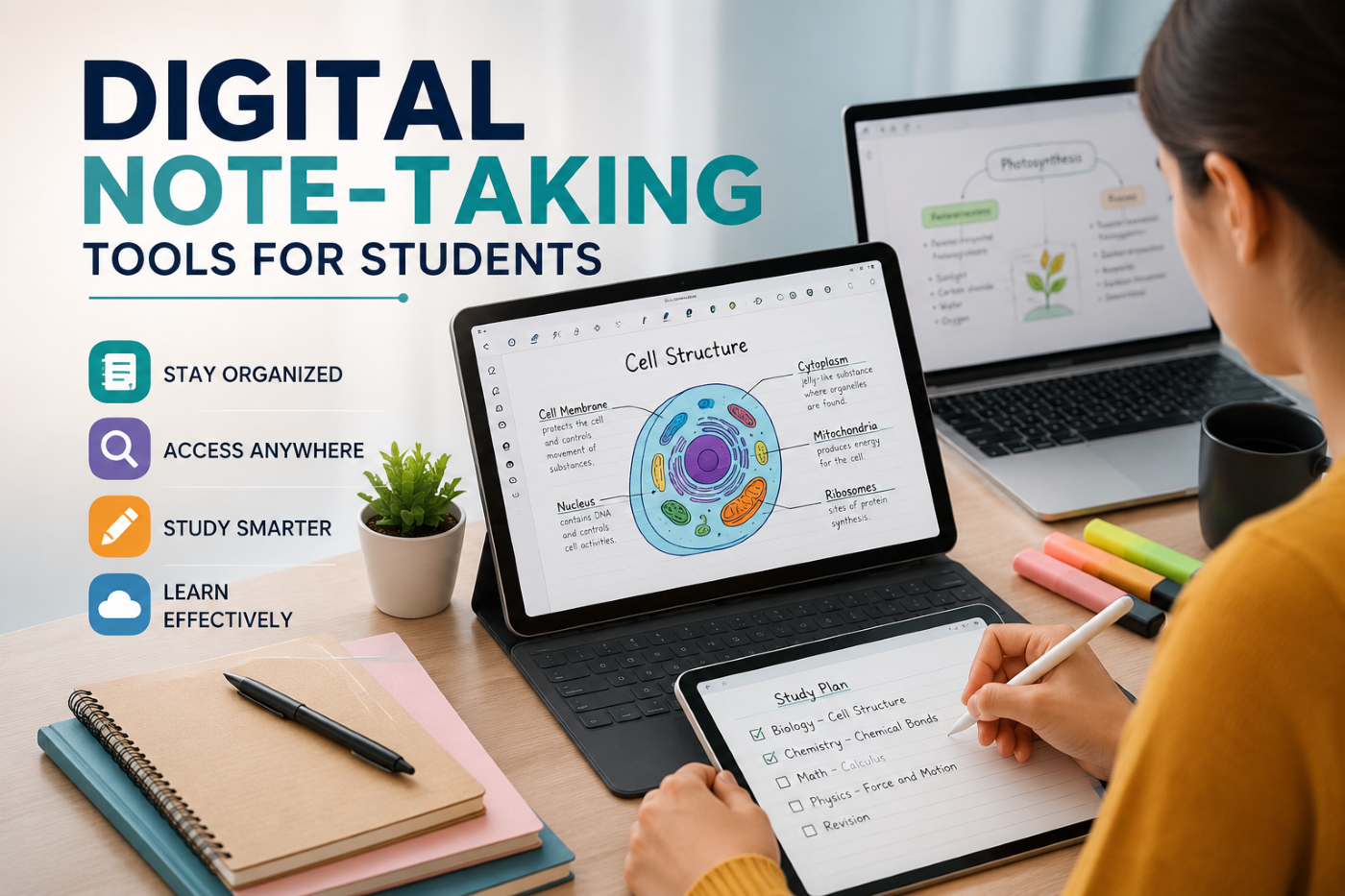
    Taking notes has always been an essential part of student life. Whether you’re attending a college lecture, preparing for an examination, researching a topic, or learning a new professional skill, effective notes can help you remember information and organize your thoughts. However, the way students take notes is changing. With laptops, tablets, smartphones, and cloud-based applications becoming part of everyday education, digital note-taking has emerged as a practical alternative to traditional pen-and-paper methods.

    Digital note-taking tools allow students to create, organize, edit, search, and access their notes from almost anywhere. Instead of carrying multiple notebooks, students can maintain an organized digital knowledge library that grows with them throughout their academic and professional journey.

    At CVDragon, we believe that effective learning is not only about acquiring knowledge but also about managing it effectively. Digital note-taking can help students become more organized, improve their study habits, and create a personal system for managing information. However, the best results come from choosing the right tool and using it with a consistent note-taking strategy.

    What Is Digital Note-Taking?

    Digital note-taking involves recording and organizing information using electronic devices and software instead of traditional notebooks.

    Students can use:

    • Laptops.
    • Tablets.
    • Smartphones.
    • Digital pens and styluses.
    • Cloud-based note applications.
    • Document management platforms.

    Depending on the tool, students may create typed notes, handwritten notes, diagrams, voice recordings, checklists, screenshots, or links to external resources.

    Digital notes can be updated whenever needed and often synchronized across multiple devices.

    Why Digital Note-Taking Is Becoming Popular

    Students today manage large amounts of information. Between lectures, assignments, online courses, research papers, internships, and professional learning, keeping everything organized can be challenging.

    Digital note-taking can make information management easier by allowing students to:

    • Search notes quickly.
    • Organize information by subject.
    • Edit notes without rewriting entire pages.
    • Add images and links.
    • Synchronize information across devices.
    • Access notes remotely.
    • Create backups.
    • Connect related information.

    These features make digital notes particularly useful for students managing multiple subjects and learning activities.

    Choose the Right Digital Note-Taking Tool

    There is no single note-taking application that works perfectly for every student. The right choice depends on individual learning preferences and academic requirements.

    Before selecting a tool, consider:

    • Ease of use.
    • Device compatibility.
    • Cloud synchronization.
    • Search functionality.
    • Offline access.
    • Handwriting support.
    • File organization.
    • Collaboration features.
    • Security and privacy.

    A student who prefers typing may need a different tool from someone who learns best through handwritten diagrams.

    Popular Types of Digital Note-Taking Tools

    Students can choose from several categories of digital note-taking platforms.

    Simple Note Applications

    These are useful for quick notes, reminders, and short lists. They are ideal for students who want a simple way to capture information without complicated organization systems.

    Digital Notebook Platforms

    These tools are designed to replicate the structure of physical notebooks while offering digital features. Students can create separate notebooks for different subjects and organize notes into sections.

    Knowledge Management Tools

    These platforms allow students to build interconnected knowledge systems. They are useful for research, long-term learning, and organizing information across multiple topics.

    Handwritten Note Applications

    Students who prefer writing by hand can use tablets and styluses to create digital handwritten notes. These tools can be especially useful for mathematics, science, architecture, and design.

    Collaborative Documents

    Cloud-based documents allow multiple students to work together on notes, projects, and assignments in real time.

    Use Digital Notes for Lecture Preparation

    Digital note-taking can begin before a lecture starts.

    Students can create a page for each class and add:

    • Lecture topics.
    • Reading materials.
    • Questions.
    • Previous notes.
    • Important assignments.

    During the lecture, they can add new information to the same document.

    This creates a continuous record of the learning process and makes revision easier.

    Organize Notes by Subject and Topic

    One of the biggest advantages of digital notes is organization.

    Instead of keeping dozens of notebooks, students can create a clear structure.

    For example:

    University

    → Computer Science

    → Programming

    → Data Structures

    → Algorithms

    Business

    → Marketing

    → Consumer Behavior

    → Digital Marketing

    This structure makes it easier to find information later.

    Students should avoid creating an overly complicated system. The best organization method is one they can maintain consistently.

    Use Search Features to Find Information Quickly

    Digital search functionality is one of the most valuable advantages of electronic notes.

    Instead of manually searching through pages of handwritten notes, students can search for a keyword and quickly locate relevant information.

    For example, if a student wants to find notes about “supply chain management,” they can search the term instead of reviewing every page of a notebook.

    This saves time, especially during exam preparation.

    Combine Text with Visual Learning

    Digital notes don’t have to be limited to paragraphs.

    Students can include:

    • Diagrams.
    • Charts.
    • Screenshots.
    • Images.
    • Tables.
    • Mind maps.
    • Links.

    Visual elements can help students understand relationships between ideas and remember complex concepts.

    For subjects involving processes or systems, combining written explanations with diagrams can make notes much more effective.

    Try Different Note-Taking Methods

    Digital tools make it easy to experiment with different note-taking techniques.

    The Cornell Method

    Divide the page into sections for notes, questions, and summaries. This method encourages active review.

    Mind Mapping

    Start with a central concept and connect related ideas visually. This works well for brainstorming and understanding relationships.

    Outline Method

    Organize information using headings, subheadings, and bullet points. This is useful for structured lectures.

    Zettelkasten-Style Notes

    Create individual notes for specific ideas and connect related concepts. This approach can be useful for students building a long-term personal knowledge system.

    Students should experiment with different methods and choose the approach that best suits their learning style.

    Use Digital Notes for Exam Preparation

    Digital notes can simplify revision by allowing students to create dedicated study materials.

    They can:

    • Highlight important concepts.
    • Create summaries.
    • Add practice questions.
    • Link related topics.
    • Build revision checklists.
    • Organize frequently asked questions.

    Students can also create a separate “exam revision” section containing only the most important information.

    This reduces the need to repeatedly review large amounts of material.

    Make Notes More Interactive

    One advantage of digital note-taking is the ability to create interactive study materials.

    Students can add:

    • Links to educational videos.
    • References to online articles.
    • Practice quizzes.
    • Flashcards.
    • External resources.
    • Audio recordings.

    For example, a student studying a programming concept can connect their written notes to a tutorial video and a practice project.

    This creates a richer learning environment.

    Use Cloud Synchronization Carefully

    Cloud synchronization allows students to access their notes from multiple devices. This can be convenient when moving between a laptop, tablet, and smartphone.

    However, students should also consider privacy and security.

    Good practices include:

    • Using strong passwords.
    • Enabling two-factor authentication where available.
    • Keeping important files backed up.
    • Avoiding storing sensitive personal information unnecessarily.
    • Reviewing sharing permissions.

    Convenience should always be balanced with responsible digital security.

    Collaborate with Classmates

    Digital note-taking tools can make group learning easier.

    Students can collaborate by:

    • Sharing lecture notes.
    • Creating group study guides.
    • Working on project documents.
    • Collecting research resources.
    • Reviewing each other’s work.

    Collaborative note-taking can also improve teamwork and communication skills.

    However, students should ensure that shared notes are accurate and respect academic integrity policies.

    Don’t Let Technology Become a Distraction

    Digital note-taking has many advantages, but it can also create distractions.

    Students may be tempted to:

    • Check social media.
    • Browse unrelated websites.
    • Respond to notifications.
    • Switch between multiple applications.

    To stay focused, students can:

    • Turn off unnecessary notifications.
    • Use distraction-free modes.
    • Keep only essential applications open.
    • Set specific study periods.
    • Take regular breaks.

    The goal is to use technology as a learning tool rather than allowing it to interrupt the learning process.

    Digital Notes vs. Handwritten Notes

    The debate between digital and handwritten notes continues among students and educators. Both approaches have advantages.

    Digital notes are often better for:

    • Fast typing.
    • Searching information.
    • Organization.
    • Editing.
    • Cloud access.
    • Collaboration.

    Handwritten notes may be preferred for:

    • Visual learners.
    • Diagrams.
    • Mathematical equations.
    • Personal memory preferences.
    • Creative brainstorming.

    Students do not have to choose only one method. A hybrid approach can work well.

    For example, students may use a tablet for handwritten mathematics notes and a laptop for organizing research and assignments.

    Build a Personal Knowledge System

    Over time, digital notes can become more than a collection of class materials. They can develop into a personal knowledge system.

    Students can organize information related to:

    • Academic subjects.
    • Career interests.
    • Professional skills.
    • Books.
    • Courses.
    • Projects.
    • Research.
    • Personal development.

    This creates a long-term resource that students can continue using after graduation.

    A well-maintained knowledge system can also support professional growth throughout a person’s career.

    Turn Notes into Action

    Taking notes is only the first step. Students should regularly review and apply what they have learned.

    After taking notes, ask:

    • What are the key ideas?
    • What do I still not understand?
    • How can I apply this information?
    • Can I explain this concept to someone else?
    • What should I learn next?

    This approach transforms note-taking from passive information storage into active learning.

    How Digital Note-Taking Supports Career Development

    Digital notes can also support students beyond academics.

    Students can maintain separate sections for:

    • Career goals.
    • Skills to develop.
    • Internship opportunities.
    • Interview preparation.
    • Resume ideas.
    • Professional contacts.
    • Industry research.

    This can help students organize their career development alongside their academic responsibilities.

    When students learn a new skill or complete a project, they can record the experience and later use the information when updating their resume or portfolio.

    Conclusion

    Digital note-taking tools can help students manage information more efficiently, organize their studies, and create personalized learning systems. From simple note applications to advanced knowledge management platforms, students have access to a wide range of technologies that can support academic success and long-term skill development.

    At CVDragon, we believe that the most effective note-taking system is the one that students can use consistently. The latest application or most advanced feature is not necessarily the best choice if it makes learning complicated. Students should focus on choosing tools that match their learning style, organizing information clearly, and reviewing their notes regularly.

    The real value of digital note-taking comes from what students do with the information they collect. When notes are reviewed, connected, practiced, and applied, they become a powerful part of the learning process.

    By combining effective note-taking techniques with digital tools, students can create a personal knowledge system that supports them throughout college and beyond. The notes created today can become valuable resources for future exams, projects, internships, job interviews, and professional development—turning everyday learning into a long-term investment in career success.
  • Building a Personal Knowledge System: How Students Can Organize What They Learn and Turn It Into Lasting Skills

    Building a Personal Knowledge System: How Students Can Organize What They Learn and Turn It Into Lasting Skills

    In today’s fast-changing world, learning is no longer limited to classrooms, textbooks, or formal courses. Students have access to an enormous amount of information through online courses, videos, articles, podcasts, digital communities, webinars, and professional platforms. While this access creates exciting opportunities, it also creates a new challenge: how do you organize everything you learn so that it remains useful?

    Many students consume a lot of educational content but struggle to remember it later. They may save dozens of articles, bookmark hundreds of videos, take notes in different applications, or collect certificates without having a clear system for connecting their knowledge. Over time, information becomes scattered and difficult to retrieve.

    This is where a personal knowledge system can make a significant difference.

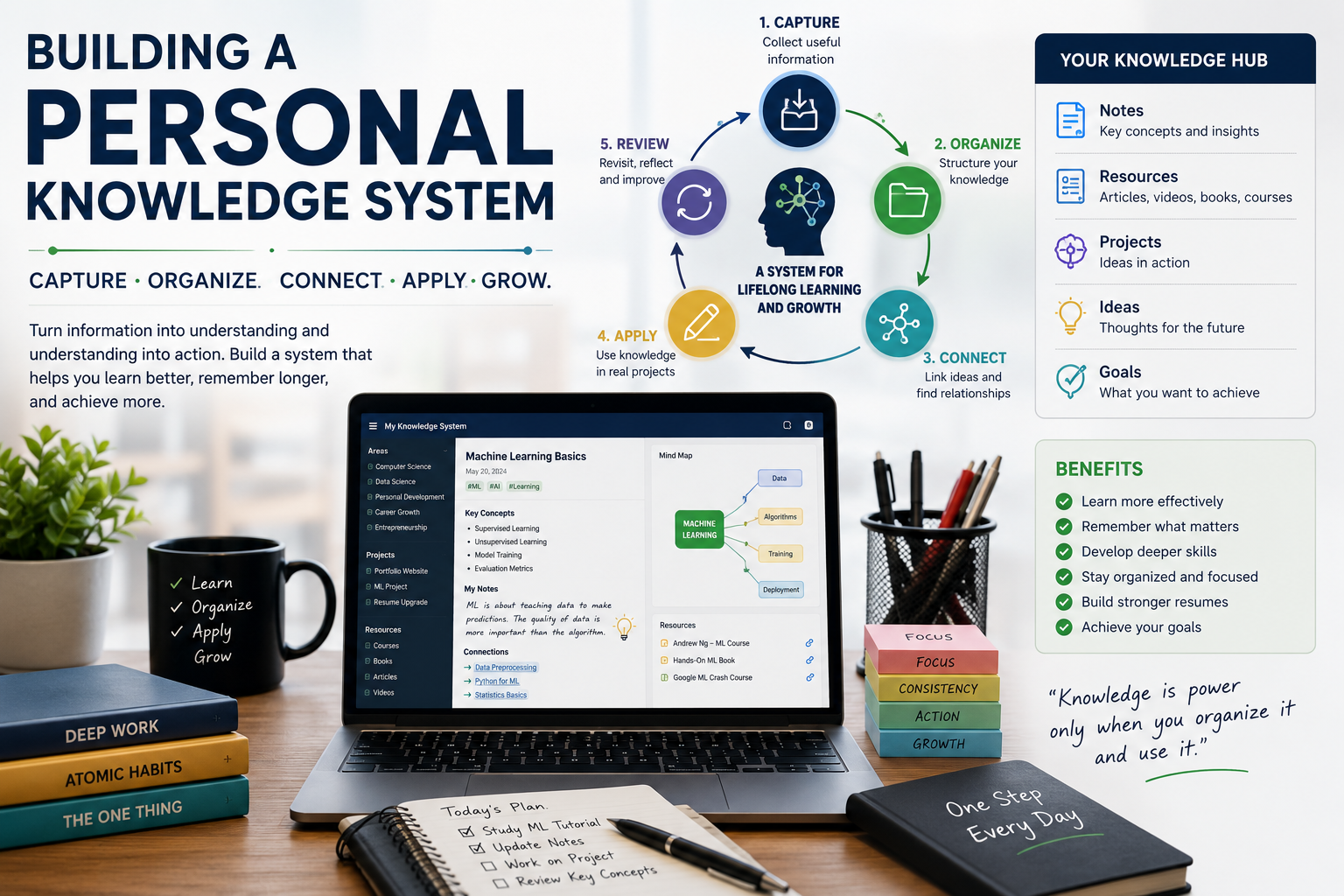
    A personal knowledge system is a structured method for capturing, organizing, connecting, reviewing, and applying information. It helps students transform random pieces of information into a useful collection of knowledge that can support academic performance, skill development, career preparation, and personal growth.

    For students building their careers, creating a personal knowledge system can also complement their resume-building journey. Platforms such as cvDragon can help students present their skills and achievements, while a well-organized knowledge system helps them continuously develop the skills and experiences they eventually want to showcase.

    What Is a Personal Knowledge System?

    A personal knowledge system is a collection of tools, habits, and processes that help you manage information and knowledge in a way that works for you.

    It is more than simply taking notes.

    A strong knowledge system helps you:

    • Capture useful information
    • Organize your notes
    • Connect related ideas
    • Find information quickly
    • Review important concepts
    • Apply what you have learned
    • Identify knowledge gaps
    • Build new skills over time

    For example, imagine that a student wants to learn digital marketing. They may watch a YouTube video about SEO, complete an online course about social media marketing, read an article about content strategy, and attend a webinar about analytics.

    Without a system, these resources may remain separate pieces of information.

    With a personal knowledge system, the student can connect these concepts and gradually build a larger understanding of digital marketing. They can record key ideas, add examples, practice the skills, and eventually use their knowledge in a real project.

    The goal is not to collect the most information. The goal is to build knowledge that you can remember, understand, and use.

    Why Students Need a Personal Knowledge System

    Students today are surrounded by information. The challenge is no longer finding information—it is managing it effectively.

    A personal knowledge system can help students overcome several common problems.

    Information Overload

    The internet provides endless learning resources. Without a system, students may jump from one topic to another without developing deep knowledge.

    A personal knowledge system creates structure and helps students focus on information that is genuinely relevant to their goals.

    Forgetting What You Learn

    Students often study for exams, complete assignments, and move on to the next topic. Without regular review and practical application, much of that knowledge can be forgotten.

    A knowledge system gives students a place to store important concepts and revisit them when necessary.

    Scattered Notes

    Many students use different notebooks, apps, documents, and messaging platforms to store information. This makes it difficult to find anything later.

    A centralized system can make knowledge easier to access.

    Lack of Connection Between Ideas

    Knowledge becomes more powerful when concepts are connected.

    For example, a student studying business might connect marketing, consumer psychology, data analytics, and finance. These connections can lead to better understanding and more creative thinking.

    Step 1: Define What You Want to Learn

    Before building a knowledge system, identify your learning goals.

    Ask yourself:

    • What skills do I want to develop?
    • What subjects do I want to understand better?
    • What career am I preparing for?
    • What knowledge will help me achieve my goals?
    • What problems do I want to learn how to solve?

    Your system should support your objectives.

    For example, a computer science student may focus on:

    • Programming
    • Data structures
    • Artificial intelligence
    • Cloud computing
    • Cybersecurity
    • Software development

    A business student may focus on:

    • Marketing
    • Finance
    • Business strategy
    • Entrepreneurship
    • Leadership
    • Data analytics

    Defining your learning priorities prevents your knowledge system from becoming a digital storage space filled with information you never use.

    Step 2: Choose One Main Place for Your Knowledge

    One of the simplest ways to create a personal knowledge system is to choose a central location for your notes.

    You can use:

    • A digital note-taking application
    • A document management system
    • A personal wiki
    • A physical notebook
    • A combination of digital and physical tools

    The specific tool is less important than consistency.

    You do not need the most advanced application. A simple system that you actually use is better than a sophisticated system that feels too complicated.

    Choose a platform that allows you to:

    • Create organized notes
    • Search for information
    • Add links
    • Categorize topics
    • Update information
    • Access your knowledge easily

    Step 3: Create a Simple Organizational Structure

    Avoid creating too many categories at the beginning.

    A simple structure might include:

    1. Areas

    These are broad subjects you care about.

    Examples:

    • Career
    • Education
    • Technology
    • Personal Development

    2. Projects

    These are specific activities you are currently working on.

    Examples:

    • Build a portfolio website
    • Complete a programming project
    • Prepare for an internship
    • Create a marketing campaign

    3. Resources

    These include books, articles, videos, courses, and other materials you want to explore.

    4. Notes

    These are your own thoughts, explanations, observations, and insights.

    This structure makes it easier to separate information from active work.

    Step 4: Capture Information Efficiently

    Whenever you learn something useful, capture it.

    However, avoid copying everything.

    Instead, record:

    • The main idea
    • Important facts
    • Your interpretation
    • Practical examples
    • Questions you still have
    • Connections to other topics

    For example, instead of copying an entire article about time management, write a short note explaining the key principle and how you might apply it to your daily routine.

    The best notes are often written in your own words.

    Writing information in your own language forces you to process the concept rather than simply storing it.

    Step 5: Use the “Progressive Summarization” Approach

    A useful strategy for managing information is progressive summarization.

    The basic idea is to gradually make important information easier to understand.

    You might begin by saving an article or resource. Later, you highlight the most useful sections. After that, you write a short summary in your own words.

    Over time, the most valuable information becomes easier to review.

    This approach prevents you from spending excessive time organizing every piece of information immediately.

    Step 6: Connect Ideas Together

    One of the most powerful aspects of a personal knowledge system is the ability to connect ideas.

    Suppose you have notes about:

    • Artificial intelligence
    • Data analytics
    • Business strategy
    • Customer behavior

    You might discover that these topics are connected through AI-powered customer analytics.

    By linking related concepts, you can develop a broader understanding of complex subjects.

    Ask questions such as:

    • What does this concept remind me of?
    • Where else can I apply this idea?
    • How does this topic relate to something I already know?
    • What is similar or different?
    • Can I explain this concept using another example?

    These questions turn your knowledge system into a network of ideas rather than a collection of isolated notes.

    Step 7: Create an “Idea Bank”

    Students often have ideas but forget them because they do not record them.

    Create a dedicated space for:

    • Project ideas
    • Business ideas
    • Content ideas
    • Research questions
    • Career opportunities
    • Problems you want to solve
    • Skills you want to learn

    You do not need to develop every idea immediately.

    The purpose is to create a place where ideas can be stored until you are ready to explore them.

    An idea that seems unimportant today may become valuable in the future.

    Step 8: Turn Knowledge Into Projects

    Knowledge becomes more valuable when you apply it.

    If you learn:

    • Web development, build a website.
    • Data analytics, analyze a dataset.
    • Graphic design, create a portfolio.
    • Digital marketing, develop a campaign.
    • Public speaking, record a presentation.
    • Business strategy, analyze a real company.

    Projects help you move from knowing to doing.

    They also create tangible evidence of your skills. This can be especially useful when building a resume or preparing for internships and job applications.

    A student who says, “I know Python,” may have limited evidence of that skill.

    A student who can say, “I used Python to build a data analysis project and documented the results,” can demonstrate practical application.

    Step 9: Review Your Knowledge Regularly

    A personal knowledge system is only useful if you revisit it.

    Set aside time to review your notes.

    You might review:

    • Important concepts weekly
    • Current projects every few days
    • Learning goals monthly
    • Career progress every few months

    During your review, ask:

    • What did I learn?
    • What did I actually use?
    • What do I still not understand?
    • Which skills are improving?
    • What should I learn next?

    Regular reviews help you identify gaps and keep your learning focused.

    Step 10: Create Your Own Learning Dashboard

    As your knowledge system grows, you can create a simple dashboard to track your progress.

    You might include:

    Category Current Focus Progress
    Technical Skills Python Intermediate
    Communication Public Speaking Improving
    Career Resume Development Completed
    Projects Portfolio Website In Progress
    Certifications Data Analytics Planned

    The dashboard does not need to be complicated. Its purpose is to provide a quick overview of where you are and where you want to go.

    Personal Knowledge Systems and Resume Building

    One of the biggest advantages of building a personal knowledge system is that it can support your career development.

    Students often struggle to remember everything they have accomplished. After several semesters, they may forget the projects they completed, workshops they attended, skills they practiced, or responsibilities they took on.

    A knowledge system can act as a career record.

    You can maintain sections for:

    • Academic achievements
    • Projects
    • Internships
    • Certifications
    • Technical skills
    • Soft skills
    • Volunteer experiences
    • Leadership roles
    • Competitions
    • Workshops
    • Extracurricular activities

    When it is time to update your resume, you can review this information and identify the most relevant experiences.

    Using a resume platform such as cvDragon, students can then organize and present their qualifications more effectively.

    The knowledge system and resume serve different purposes:

    Your knowledge system helps you grow and remember.

    Your resume helps you communicate your value to employers.

    Together, they can create a stronger career development process.

    Common Mistakes to Avoid

    Building a personal knowledge system is useful, but there are several mistakes students should avoid.

    Overcomplicating the System

    Do not spend more time designing your system than learning.

    Start simple and improve it gradually.

    Collecting Without Processing

    Saving hundreds of articles does not mean you have learned anything.

    Focus on understanding and applying information.

    Excessive Categorization

    Too many folders and tags can make your system difficult to maintain.

    Use categories only when they genuinely improve organization.

    Never Reviewing Notes

    A knowledge system that you never revisit becomes a digital archive.

    Schedule regular reviews.

    Focusing Only on Consumption

    Watching videos and reading articles are useful, but active practice is essential.

    Try to balance learning with doing.

    Trying to Remember Everything

    Your system does not need to contain every detail you encounter.

    Capture information that is useful, meaningful, or relevant to your goals.

    A Simple Personal Knowledge System for Students

    Students who are just getting started can use a simple five-part framework:

    1. Capture
    Save useful information and ideas.

    2. Understand
    Rewrite important concepts in your own words.

    3. Connect
    Link new knowledge to what you already know.

    4. Apply
    Use your knowledge through projects and practice.

    5. Review
    Return to your notes and update your understanding.

    This process can gradually become a natural part of your learning routine.

    The Long-Term Benefits of a Personal Knowledge System

    A personal knowledge system is not just a productivity technique. It can become a long-term investment in your education and career.

    Over time, it can help you:

    • Learn more effectively
    • Remember important concepts
    • Develop deeper expertise
    • Identify skill gaps
    • Generate new ideas
    • Build practical projects
    • Prepare stronger resumes
    • Track career progress
    • Make better decisions

    The system becomes increasingly valuable as your knowledge grows.

    A first-year student may use it to organize coursework and explore career options. Later, the same system can support internships, projects, job applications, professional development, and lifelong learning.

    Conclusion

    Building a personal knowledge system gives students a practical way to manage the enormous amount of information they encounter every day. Instead of allowing useful ideas to disappear into scattered notes, bookmarks, and saved videos, students can create a structured environment where knowledge is captured, connected, reviewed, and applied.

    The most effective system is not necessarily the most sophisticated one. It is the system that you can maintain consistently and that helps you turn information into understanding and understanding into action.

    For students, this approach can also strengthen career preparation. By keeping track of skills, projects, achievements, and learning experiences, students can build a clearer picture of their professional growth and use that information when preparing their resumes and portfolios.

    With a platform like cvDragon helping students present their qualifications and a personal knowledge system helping them continuously develop those qualifications, students can create a more organized approach to lifelong learning and career growth.

    In the end, the goal is simple: don’t just collect knowledge—build a system that helps you use it.

  • How Students Can Use YouTube for Learning: A Complete Guide to Smarter and More Effective Online Education

    How Students Can Use YouTube for Learning: A Complete Guide to Smarter and More Effective Online Education

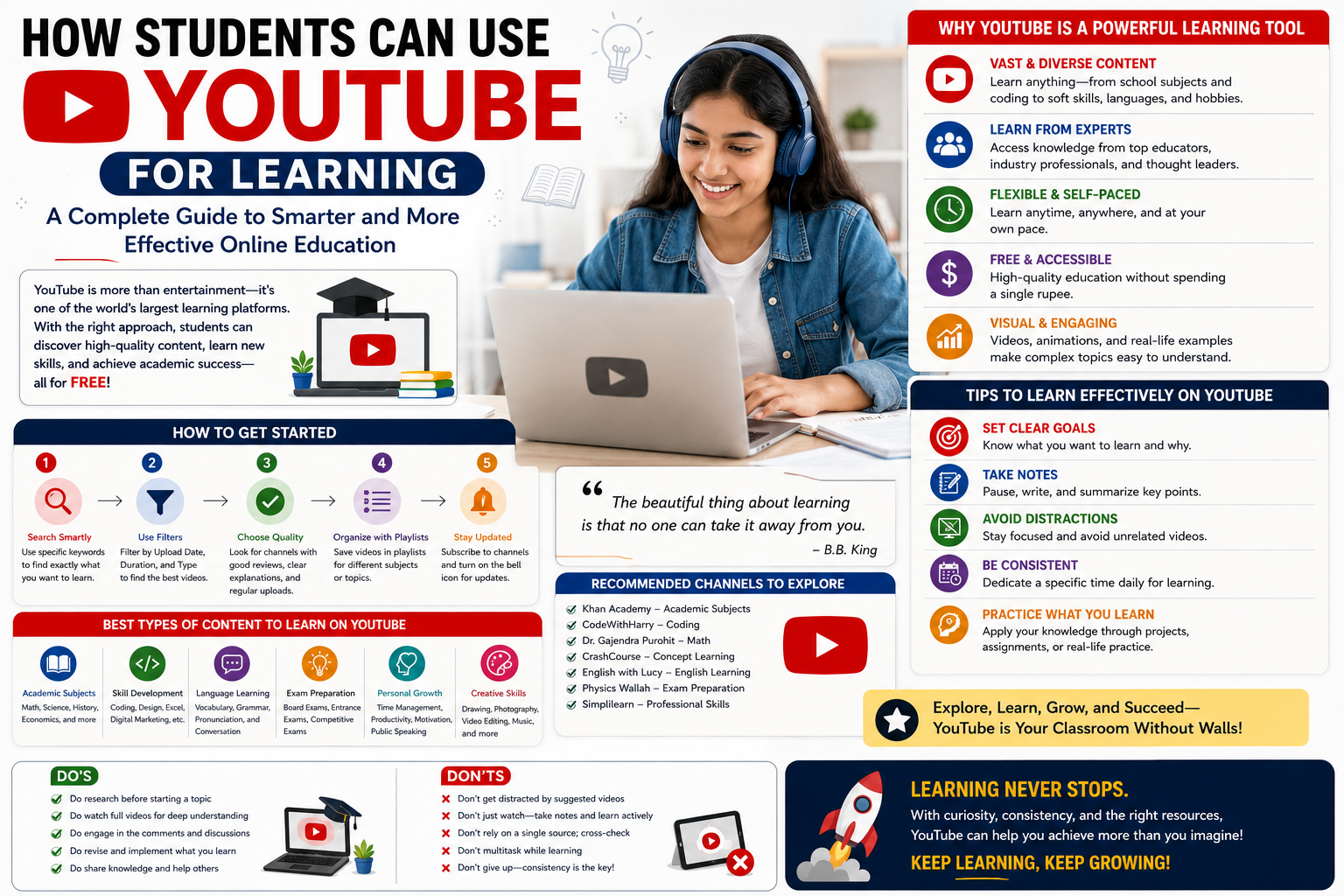
    YouTube is often associated with entertainment, music, and social media content, but it has also become one of the world’s most accessible learning platforms. Students can use YouTube to understand difficult academic concepts, learn practical skills, explore new subjects, prepare for exams, develop career skills, and discover new areas of interest. With millions of educational videos available for free, the platform offers students an opportunity to supplement traditional education and learn at their own pace.

    At CVDragon, we believe that effective learning is not limited to textbooks or classrooms. Students who know how to use digital resources responsibly can expand their knowledge, develop valuable skills, and become more confident learners. However, using YouTube effectively requires more than simply watching random videos. Students need to develop a structured approach that helps them find reliable content, avoid distractions, take meaningful notes, and apply what they learn.

    Why YouTube Can Be a Powerful Learning Tool

    Traditional classroom education provides structure, but students do not always learn at the same speed. Some may understand a topic immediately, while others may need additional explanations and examples.

    YouTube gives students the flexibility to:

    • Learn at their own pace.
    • Pause and replay difficult explanations.
    • Watch visual demonstrations.
    • Explore different teaching styles.
    • Learn practical skills.
    • Access expert perspectives.
    • Study topics beyond their academic curriculum.

    For students who struggle with a particular concept, watching multiple explanations from different educators can make complex subjects easier to understand.

    Use YouTube to Understand Difficult Academic Concepts

    One of the simplest ways students can use YouTube is to supplement classroom learning.

    If a student finds a topic difficult, they can search for educational videos that explain the concept in simpler language. Visual demonstrations, animations, diagrams, and real-world examples can often make complicated ideas easier to understand.

    For example, students can use educational videos to explore:

    • Mathematics problems.
    • Science experiments.
    • Historical events.
    • Economic concepts.
    • Programming fundamentals.
    • Accounting principles.
    • Language skills.

    The goal should not be to replace textbooks or teachers but to use YouTube as an additional resource for better understanding.

    Create a Learning Playlist

    YouTube can become more useful when students organize educational content into playlists.

    Instead of watching unrelated videos, students can create separate playlists for different learning goals, such as:

    • College subjects.
    • Programming.
    • Communication skills.
    • Interview preparation.
    • Digital marketing.
    • Data analytics.
    • Career development.

    A structured playlist creates a personalized learning library that students can return to whenever needed.

    Learn Practical and Career-Oriented Skills

    Academic knowledge is important, but students also need practical skills to prepare for employment.

    YouTube provides access to tutorials and demonstrations covering a wide range of professional skills.

    Students can learn:

    • Coding and software development.
    • Graphic design.
    • Video editing.
    • Digital marketing.
    • Excel and data analysis.
    • Public speaking.
    • Presentation skills.
    • Entrepreneurship.
    • Personal branding.
    • Resume development.

    Learning these skills early can help students build stronger portfolios and become more prepared for internships and entry-level jobs.

    Learn from Industry Professionals

    Many professionals, educators, entrepreneurs, and subject experts share their knowledge through YouTube channels.

    Students can follow creators who work in their areas of interest and learn about:

    • Industry trends.
    • Career paths.
    • Professional challenges.
    • Emerging technologies.
    • Workplace expectations.
    • Skill requirements.

    For example, a student interested in software development can follow experienced developers to learn about programming languages, development tools, and real-world projects.

    This exposure can help students understand what skills they need to develop before entering the professional world.

    Use YouTube for Exam Preparation

    YouTube can be a useful supplementary resource during exam preparation.

    Students can search for:

    • Topic explanations.
    • Revision videos.
    • Concept summaries.
    • Problem-solving tutorials.
    • Practice questions.
    • Exam strategies.

    However, students should verify information against their official textbooks, course materials, and teacher guidance. Not every educational video is accurate or aligned with a specific curriculum.

    YouTube should support exam preparation rather than become the only source of study material.

    Learn Through Visual Demonstrations

    Some subjects are easier to understand when students can see concepts being demonstrated.

    YouTube is particularly useful for visual learning because students can watch:

    • Science experiments.
    • Engineering demonstrations.
    • Software tutorials.
    • Design processes.
    • Mathematical problem-solving.
    • Historical documentaries.
    • Laboratory techniques.

    Visual learning can make abstract concepts more concrete and easier to remember.

    Practice Active Learning While Watching

    Simply watching videos does not guarantee learning. Students should actively engage with the content.

    While watching educational videos, students can:

    • Take notes.
    • Pause to summarize key ideas.
    • Write down unfamiliar terms.
    • Create questions.
    • Try solving problems independently.
    • Explain the concept in their own words.

    A useful technique is to pause the video before the explanation is revealed and try to predict the answer. This turns passive viewing into active learning.

    Take Notes and Build a Personal Knowledge Base

    Students should avoid relying entirely on video memory. Taking notes helps organize and retain information.

    They can record:

    • Important concepts.
    • Definitions.
    • Examples.
    • Formulas.
    • Useful resources.
    • Questions for further research.

    Digital note-taking tools can make it easier to organize information by subject or skill.

    Over time, students can build a personal knowledge library that supports their academic and professional development.

    Learn New Languages

    YouTube can also support language learning.

    Students can find videos for:

    • Vocabulary.
    • Grammar.
    • Pronunciation.
    • Conversation practice.
    • Listening skills.
    • Cultural understanding.

    Watching interviews, news programs, or educational content in the language being learned can help students become more comfortable with real-world communication.

    Combining video learning with active speaking and writing practice can make language development more effective.

    Develop Communication and Public Speaking Skills

    Communication is one of the most valuable skills students can develop, regardless of their career choice.

    YouTube offers tutorials on:

    • Public speaking.
    • Presentation skills.
    • Interview preparation.
    • Professional communication.
    • Storytelling.
    • Body language.

    Students can observe how experienced speakers structure their presentations and communicate ideas.

    They can then practice by recording themselves and reviewing their performance.

    Explore Career Options

    Many students are unsure about what career path they want to pursue. YouTube can help them explore different professions before making important decisions.

    Students can watch content about:

    • Day-in-the-life experiences.
    • Career journeys.
    • Industry introductions.
    • Professional interviews.
    • Skill requirements.
    • Workplace experiences.

    This can provide useful perspectives, although students should remember that individual experiences do not represent every career or workplace.

    Using multiple sources for career research helps students develop a more balanced understanding.

    Build Projects Based on What You Learn

    One of the best ways to turn YouTube learning into real skill development is by creating projects.

    For example:

    A programming student can build a simple application.

    A design student can create a portfolio project.

    A digital marketing student can develop a mock marketing campaign.

    A data analytics student can analyze a public dataset.

    A video editing student can create a short video.

    Projects demonstrate that students can apply knowledge rather than simply consume content. They can also become valuable additions to a resume and portfolio.

    Follow Reliable Educational Channels

    Not all YouTube content is equally reliable. Students should evaluate the quality of educational videos before accepting information as accurate.

    Look for:

    • Qualified instructors.
    • Reputable educational institutions.
    • Industry professionals.
    • Well-researched explanations.
    • References and supporting sources.
    • Clear and transparent information.

    Students should be particularly careful when learning about sensitive or high-stakes topics and should cross-check important information with trusted sources.

    Avoid the YouTube Distraction Trap

    One of the biggest challenges of learning on YouTube is distraction. A student may start watching an educational video and quickly move to unrelated entertainment content.

    To avoid this:

    • Set a specific learning goal.
    • Use a dedicated study playlist.
    • Turn off unnecessary notifications.
    • Set a time limit.
    • Avoid unrelated recommendations.
    • Take breaks at planned intervals.

    The objective is to use YouTube intentionally rather than allowing the algorithm to control your attention.

    Create a Structured Learning Schedule

    Students can make YouTube learning more effective by including it in a regular study routine.

    For example:

    Monday: Watch one programming tutorial.

    Tuesday: Practice the concepts learned.

    Wednesday: Complete a small project.

    Thursday: Review previous lessons.

    Friday: Learn a new concept.

    This approach creates consistency and prevents students from consuming large amounts of content without actually developing skills.

    Don’t Become a Passive Content Consumer

    One of the biggest mistakes students make is watching endless tutorials without applying what they learn.

    The real value of YouTube comes from the cycle:

    Watch → Understand → Practice → Create → Review

    After watching a tutorial, students should immediately try to apply the knowledge.

    For example, after watching a coding tutorial, write code. After learning a design technique, create a design. After watching a communication lesson, practice speaking.

    Application transforms information into skill.

    Use YouTube Alongside Other Learning Resources

    YouTube is a valuable learning tool, but it should not be the only resource students use.

    Combine YouTube with:

    • Textbooks.
    • Online courses.
    • Academic resources.
    • Professional certifications.
    • Practice exercises.
    • Mentorship.
    • Internships.
    • Online communities.

    Different resources provide different learning experiences. A balanced approach can help students develop deeper knowledge and stronger practical abilities.

    Turn YouTube Learning into Resume Value

    The skills students develop through YouTube can become valuable when combined with practical application.

    For example, if a student learns Python through YouTube and then builds three projects, the projects can be included in a resume or portfolio.

    Similarly, students can highlight:

    • Completed projects.
    • New technical skills.
    • Portfolio work.
    • Personal initiatives.
    • Content creation.
    • Practical achievements.

    The important point is to demonstrate what was achieved through learning rather than simply stating that YouTube videos were watched.

    Create Your Own Educational Content

    Advanced learners can take their knowledge one step further by creating educational content themselves.

    Students can create:

    • Tutorial videos.
    • Project demonstrations.
    • Educational presentations.
    • Study guides.
    • Skill-based content.

    Teaching others can strengthen understanding and improve communication skills. It can also help students develop a professional digital presence.

    Conclusion

    YouTube can be a powerful learning platform for students when used with purpose and discipline. From understanding difficult academic concepts and preparing for exams to learning professional skills and exploring career options, the platform provides access to an enormous range of educational resources.

    At CVDragon, we encourage students to use YouTube as part of a broader learning strategy. The most successful learners do not simply watch videos—they actively take notes, practice new concepts, build projects, seek feedback, and apply their knowledge in real-world situations.

    The key is to move from watching to doing. A tutorial can introduce a skill, but practice develops it. A video can explain an idea, but applying it creates genuine understanding. By using YouTube intentionally and combining it with academic learning, practical projects, certifications, and professional communities, students can build valuable skills that strengthen their resumes and prepare them for future career opportunities.

    In a world where continuous learning is becoming increasingly important, students who learn how to use digital platforms effectively can take greater control of their education and professional development. With the right approach, YouTube can become more than an entertainment platform—it can become a personal classroom available whenever and wherever you need it.

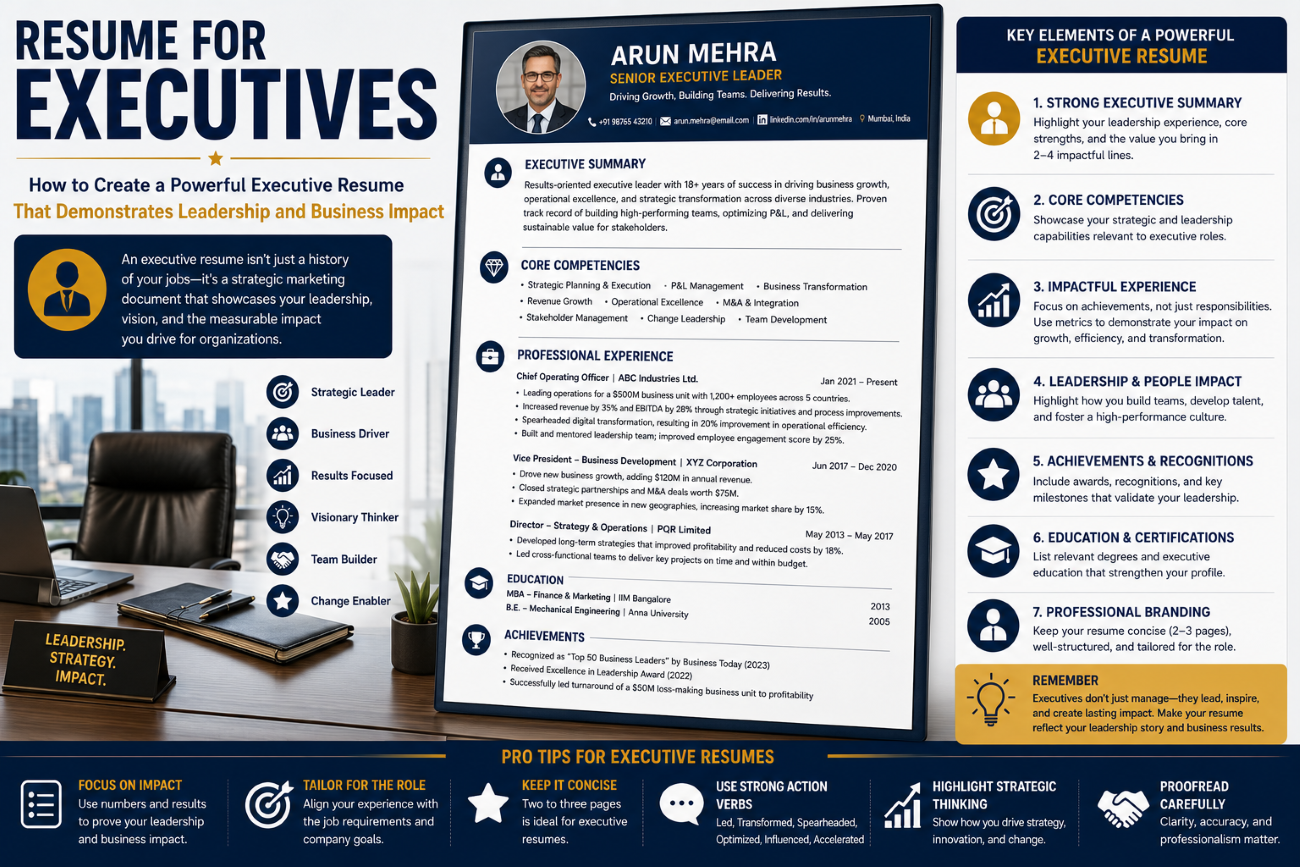
  • Resume for Leadership Roles: How to Create a Resume That Demonstrates Leadership and Impact

    Resume for Leadership Roles: How to Create a Resume That Demonstrates Leadership and Impact

    Leadership roles require more than years of professional experience. Employers look for candidates who can inspire teams, make strategic decisions, manage change, solve complex problems, and drive measurable business results. Whether you are applying for a team leader position, department head role, director-level opportunity, or senior executive position, your resume must demonstrate that you have the vision, skills, and experience to lead effectively.

    At CVDragon, we believe a leadership resume should go beyond listing job responsibilities. It should tell a clear story about your leadership journey, showcase measurable achievements, and demonstrate how your decisions have contributed to organizational growth. A well-crafted leadership resume positions you as someone who can take ownership, influence others, and create meaningful results.

    Why a Leadership Resume Needs a Different Approach

    A traditional resume often focuses on technical skills and professional responsibilities. A leadership resume, however, must communicate a broader range of capabilities.

    Recruiters looking for leadership candidates want to understand:

    • How many people have you led?
    • What business challenges have you solved?
    • What measurable results have you achieved?
    • How have you developed and motivated teams?
    • Have you successfully managed change?
    • Can you make strategic decisions?
    • How have you influenced organizational growth?

    Your resume should provide clear answers to these questions through specific examples and measurable achievements.

    Start with a Strong Leadership Summary

    The professional summary is one of the first sections recruiters notice. For leadership positions, it should immediately establish your leadership experience, industry expertise, and ability to deliver results.

    A strong leadership summary can include:

    • Years of professional experience.
    • Years of leadership experience.
    • Team size or organizational scope.
    • Areas of expertise.
    • Major accomplishments.
    • Leadership strengths.

    For example:

    “Strategic and results-driven operations leader with 12+ years of experience managing cross-functional teams, improving operational efficiency, and leading organizational transformation. Proven track record of reducing costs, increasing productivity, and developing high-performing teams. Skilled in strategic planning, change management, stakeholder engagement, and performance optimization.”

    This type of summary quickly communicates leadership capability and professional value.

    Highlight Your Leadership Style

    Your resume should provide clues about the type of leader you are. Different organizations may value different leadership qualities, so consider emphasizing the strengths that align with your target role.

    You may be known for:

    • Transformational leadership.
    • Collaborative decision-making.
    • Team development.
    • Strategic thinking.
    • Innovation.
    • Change management.
    • Performance management.
    • Crisis leadership.
    • Coaching and mentoring.

    Instead of simply stating that you are a “great leader,” demonstrate your leadership style through examples of actions and outcomes.

    Focus on Leadership Achievements

    One of the biggest mistakes candidates make is describing leadership responsibilities without demonstrating impact.

    Instead of writing:

    • Managed a team of 30 employees.

    Write:

    • Led a team of 30 professionals, introducing performance development initiatives that improved team productivity by 25% and reduced employee turnover by 18%.

    The second example provides evidence of leadership effectiveness and measurable results.

    Quantify Your Leadership Impact

    Numbers make leadership achievements more credible and easier for recruiters to understand.

    Consider including:

    • Team size.
    • Budget managed.
    • Revenue generated.
    • Cost savings.
    • Productivity improvements.
    • Employee retention rates.
    • Customer satisfaction improvements.
    • Project values.
    • Market expansion results.

    For example:

    • Managed a $5 million annual operating budget.
    • Led a 50-member cross-functional team.
    • Increased regional revenue by 35%.
    • Reduced operating expenses by 20%.
    • Improved employee retention by 22%.

    Quantifiable achievements demonstrate the scale of your leadership responsibilities.

    Demonstrate Team Building Skills

    Effective leaders build strong teams. Employers want candidates who can recruit, develop, motivate, and retain talented employees.

    Highlight experiences such as:

    • Building new teams.
    • Hiring and onboarding employees.
    • Mentoring junior professionals.
    • Developing leadership pipelines.
    • Creating employee development programs.
    • Improving team performance.
    • Supporting employee engagement.

    Whenever possible, explain the results of your team-building efforts.

    Showcase Strategic Thinking

    Leadership roles often require individuals to think beyond daily operations and focus on long-term organizational goals.

    Demonstrate strategic thinking through examples involving:

    • Business planning.
    • Market expansion.
    • Digital transformation.
    • New product launches.
    • Organizational restructuring.
    • Process improvement.
    • Risk management.
    • Strategic partnerships.

    For example:

    “Developed and implemented a three-year operational strategy that improved productivity by 30% and supported expansion into two new markets.”

    This demonstrates your ability to connect leadership decisions with long-term business objectives.

    Highlight Change Management Experience

    Organizations constantly evolve due to technology, market conditions, customer expectations, and internal restructuring. Leaders must be capable of guiding teams through change.

    Include examples of situations where you:

    • Implemented new technologies.
    • Led organizational restructuring.
    • Managed mergers or acquisitions.
    • Introduced new processes.
    • Guided teams through business transformation.
    • Improved adoption of new systems.

    Explain how you communicated change, managed resistance, and achieved successful outcomes.

    Showcase Problem-Solving and Decision-Making

    Leadership often involves making difficult decisions under pressure. Your resume should demonstrate your ability to analyze challenges and implement effective solutions.

    Highlight examples where you:

    • Resolved major operational problems.
    • Reduced business risks.
    • Improved inefficient processes.
    • Managed crises.
    • Addressed performance issues.
    • Developed innovative solutions.

    Use action-oriented language to demonstrate ownership and accountability.

    Include Leadership Skills

    Your skills section should combine strategic, interpersonal, and professional competencies.

    Leadership Skills

    • Strategic Planning
    • Team Leadership
    • Change Management
    • Conflict Resolution
    • Decision-Making
    • Coaching and Mentoring
    • Performance Management
    • Stakeholder Management
    • Organizational Development
    • Crisis Management

    Business Skills

    • Budget Management
    • Business Development
    • Process Improvement
    • Risk Management
    • Project Management
    • Data Analysis
    • Operational Strategy
    • Performance Optimization

    Select skills that match the leadership role you are targeting.

    Showcase Cross-Functional Collaboration

    Senior leaders rarely work in isolation. They collaborate with multiple departments, executives, clients, and external stakeholders.

    Demonstrate experience working with:

    • Sales teams.
    • Marketing departments.
    • Finance teams.
    • Human resources.
    • Technology teams.
    • Operations.
    • External partners.

    Cross-functional leadership demonstrates your ability to align different groups toward common objectives.

    Highlight Mentoring and Talent Development

    Strong leaders create future leaders. If you have mentored employees or developed talent, make sure your resume reflects this experience.

    Examples include:

    • Mentoring junior managers.
    • Creating training programs.
    • Coaching high-potential employees.
    • Establishing career development plans.
    • Supporting internal promotions.
    • Building succession planning strategies.

    These achievements demonstrate your long-term contribution to organizational growth.

    Tailor Your Resume to the Leadership Position

    Leadership roles can vary significantly. A Sales Director, Operations Manager, HR Leader, and Technology Executive require different competencies.

    Before applying, review the job description and identify:

    • Leadership expectations.
    • Business objectives.
    • Required skills.
    • Industry knowledge.
    • Team management responsibilities.
    • Strategic priorities.

    Then customize your summary, skills, and achievements to align with the role.

    Optimize Your Resume for ATS

    Many organizations use Applicant Tracking Systems to screen resumes before recruiters review them.

    To improve ATS compatibility:

    • Use standard section headings.
    • Include relevant keywords from the job description.
    • Avoid excessive graphics and complex tables.
    • Use a clean layout.
    • Maintain consistent formatting.
    • Use commonly recognized job titles where appropriate.

    An ATS-friendly resume improves your chances of reaching the decision-maker.

    Common Mistakes to Avoid

    Leadership candidates often make the mistake of assuming that their job title alone demonstrates leadership. It doesn’t. Your resume needs evidence.

    Avoid:

    • Listing responsibilities without achievements.
    • Using vague leadership statements.
    • Failing to quantify results.
    • Focusing too heavily on technical tasks.
    • Ignoring team development.
    • Using a generic resume for every leadership role.
    • Including outdated or irrelevant experience.

    Your resume should demonstrate what you accomplished as a leader, not simply what your position required you to do.

    Keep Your Resume Focused and Professional

    Experienced leaders may have decades of professional experience, but that does not mean every detail needs to appear on the resume.

    Prioritize:

    • Recent leadership experience.
    • Relevant achievements.
    • Strategic initiatives.
    • Major promotions.
    • Leadership competencies.
    • Measurable business impact.

    Older experience can be summarized when it is no longer directly relevant to your target position.

    Prepare for Leadership Interviews

    Your resume is only the first step. Once you secure an interview, recruiters will likely ask for specific examples of your leadership abilities.

    Be prepared to discuss:

    • A difficult decision you made.
    • A team conflict you resolved.
    • A major change you implemented.
    • A time you developed an employee.
    • A project you successfully led.
    • A business challenge you overcame.

    Use the STAR method—Situation, Task, Action, and Result—to explain your experiences clearly and demonstrate your impact.

    How CVDragon Can Help Build a Leadership Resume

    Creating a leadership resume requires a strategic approach that highlights more than job titles and years of experience. CVDragon helps professionals create structured, ATS-friendly resumes that emphasize leadership achievements, transferable skills, measurable results, and career progression.

    Whether you are applying for your first formal leadership position or targeting a senior management opportunity, your resume should clearly communicate your ability to lead people, manage challenges, and deliver results.

    Conclusion

    A resume for leadership roles should present you as a strategic thinker, an effective people manager, and a results-driven professional. By highlighting measurable achievements, team-building experience, strategic initiatives, change management capabilities, and decision-making skills, you can demonstrate your readiness to take on greater responsibility.

    At CVDragon, we believe that strong leadership deserves to be presented with clarity and confidence. Your resume should not simply say that you have led teams—it should show how your leadership created measurable value. By building a focused, achievement-oriented, and ATS-friendly resume, you can strengthen your professional brand, attract the attention of recruiters, and move closer to the leadership opportunity you want.

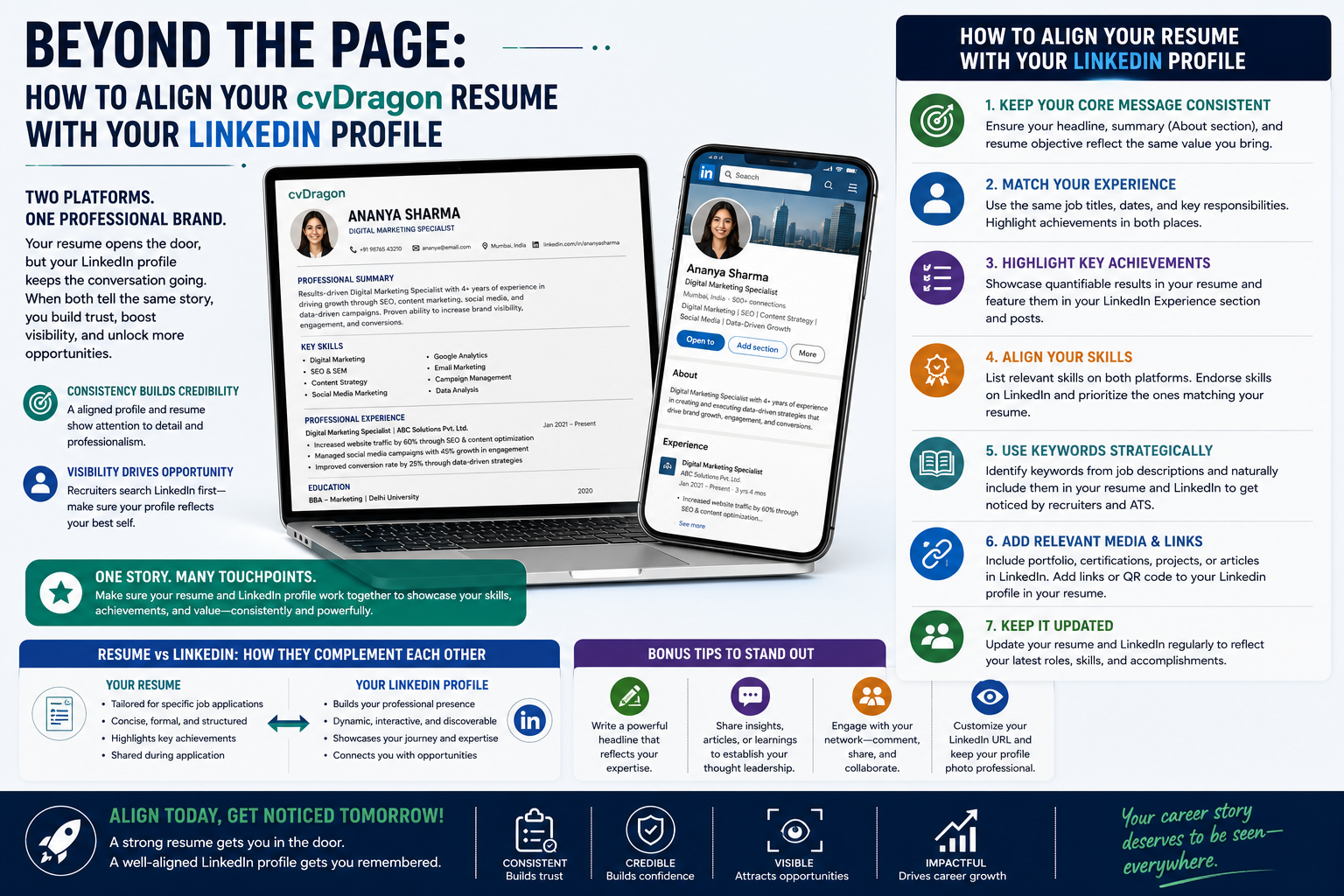
  • Beyond the Page: How to Align Your cvDragon Resume with Your LinkedIn Profile

    Beyond the Page: How to Align Your cvDragon Resume with Your LinkedIn Profile

    In today’s digital-first job market, your resume is no longer the only document recruiters use to evaluate your professional profile. Your LinkedIn profile has become an important extension of your career identity, allowing employers, recruiters, and professional connections to learn more about your experience, skills, achievements, and career goals. This makes consistency between your resume and LinkedIn profile more important than ever.

    Imagine a recruiter receiving your CVDragon resume and then visiting your LinkedIn profile. If your resume says you have five years of experience but your LinkedIn profile shows seven, or your job titles, employment dates, skills, and achievements don’t match, the inconsistency may create doubts about your credibility. On the other hand, when both profiles present a consistent and professional career story, you create a stronger personal brand and make it easier for recruiters to understand your value.

    At CVDragon, we believe your resume and LinkedIn profile should work together rather than exist as separate professional documents. Your resume can provide a focused, job-specific presentation of your qualifications, while LinkedIn offers a broader picture of your professional journey. By aligning the two strategically, you can build a stronger online presence and improve your chances of attracting the right career opportunities.

    Why Your Resume and LinkedIn Profile Should Be Aligned

    Your resume and LinkedIn profile serve different purposes, but they should tell the same overall story.

    Your resume is typically customized for a specific job application. It highlights the skills, experience, and achievements most relevant to a particular position.

    LinkedIn, on the other hand, is a broader professional profile. It helps you:

    • Build your professional identity.
    • Connect with industry professionals.
    • Showcase your career journey.
    • Share knowledge and achievements.
    • Attract recruiters.
    • Discover career opportunities.

    While the content doesn’t need to be identical, important facts should remain consistent. This includes job titles, employment dates, education, certifications, and major career achievements.

    Start with Your Professional Identity

    The first step in aligning your CVDragon resume and LinkedIn profile is defining your professional identity.

    Ask yourself:

    • What type of professional am I?
    • What industry do I work in?
    • What roles am I targeting?
    • What are my strongest skills?
    • What value do I bring to employers?

    Your resume summary and LinkedIn headline should communicate this identity clearly.

    For example, if you are a digital marketing professional specializing in SEO and performance marketing, your resume and LinkedIn profile should consistently reflect those areas of expertise.

    This creates a clear professional brand that recruiters can easily recognize.

    Align Your Job Titles and Employment Dates

    One of the most important details to keep consistent is your employment history.

    Make sure the following information matches:

    • Company names.
    • Job titles.
    • Employment dates.
    • Promotions.
    • Career progression.

    If your official job title is very specialized or unclear to external recruiters, you may use a more understandable equivalent on your resume, but avoid misrepresenting your position.

    Consistency in employment history helps establish credibility and prevents confusion.

    Keep Your Career Story Consistent

    Your resume and LinkedIn profile should tell a logical story about your professional development.

    For example, your career journey might show:

    Intern → Marketing Executive → Senior Marketing Specialist → Marketing Manager

    Your LinkedIn profile can provide more context about each stage, while your resume can focus on the roles and achievements most relevant to your target position.

    The key is to ensure that your career progression is accurate and easy to understand.

    Use a Consistent Professional Summary and Headline

    Your resume summary and LinkedIn “About” section don’t need to be word-for-word identical, but they should communicate the same professional direction.

    For example, your CVDragon resume might begin with:

    “Results-driven HR professional with eight years of experience in talent acquisition, employee engagement, and organizational development.”

    Your LinkedIn headline could be:

    HR Professional | Talent Acquisition | Employee Engagement | Organizational Development

    Your LinkedIn About section can then expand on your experience, career interests, and professional achievements.

    This creates consistency while allowing each platform to serve its unique purpose.

    Highlight the Same Major Achievements

    Your most important career accomplishments should appear across both platforms.

    If your resume highlights that you:

    • Increased sales by 35%.
    • Reduced operational costs by 20%.
    • Managed a team of 25 employees.

    Consider mentioning these achievements on LinkedIn as well.

    However, your LinkedIn profile can provide additional context about how you achieved those results.

    The goal is not to copy and paste everything but to reinforce your strongest professional accomplishments across both platforms.

    Match Your Skills

    Your resume and LinkedIn profile should reflect a consistent set of core skills.

    For example, if your CVDragon resume emphasizes:

    • Project Management.
    • Data Analysis.
    • Leadership.
    • Strategic Planning.

    Your LinkedIn profile should include these skills as well.

    LinkedIn allows users to add multiple skills and receive endorsements from connections. Prioritize skills that are relevant to the career opportunities you want to pursue.

    This also improves your visibility when recruiters search for candidates using specific keywords.

    Align Your Education and Certifications

    Education and certifications should be accurate and consistent across your resume and LinkedIn profile.

    Check:

    • Degree names.
    • Institution names.
    • Graduation dates.
    • Certification titles.
    • Issuing organizations.
    • Completion dates.

    If you have recently earned a certification, update both platforms promptly.

    Professional certifications can significantly strengthen your profile, particularly when applying for specialized roles.

    Use Keywords Strategically

    Recruiters often search LinkedIn using keywords related to specific skills and job titles. Applicant Tracking Systems also scan resumes for relevant keywords.

    Identify keywords from the job descriptions of positions you want to target.

    These might include:

    • Digital Transformation.
    • Data Analytics.
    • Project Management.
    • Cloud Computing.
    • Cybersecurity.
    • Business Development.
    • Talent Acquisition.

    Naturally incorporate relevant keywords into your resume and LinkedIn profile.

    Avoid keyword stuffing. Instead, use terms in meaningful descriptions of your experience and achievements.

    Keep Your LinkedIn Profile More Detailed

    Your resume should be concise and focused, while LinkedIn can provide a more comprehensive view of your career.

    For example, your resume might include three key achievements from a previous role, while your LinkedIn profile can include additional projects, responsibilities, and professional contributions.

    Think of your resume as a targeted career document and LinkedIn as your broader professional portfolio.

    This approach allows both platforms to complement each other without becoming identical copies.

    Add Your CVDragon Resume Experience to LinkedIn

    When creating a resume with CVDragon, review each section and identify information that can strengthen your LinkedIn profile.

    Consider adding:

    • Relevant projects.
    • Certifications.
    • Skills.
    • Awards.
    • Leadership experiences.
    • Volunteer work.
    • Portfolio links.

    This ensures that your LinkedIn presence reflects the professional strengths presented in your resume.

    Use a Professional Photo

    Your LinkedIn profile should include a professional and appropriate profile photo. While a photo is generally unnecessary on a modern resume in many professional markets, LinkedIn is designed as a professional networking platform where a profile image helps people recognize you.

    Choose a photo that is:

    • Clear.
    • Professional.
    • Recent.
    • Appropriate for your industry.

    Your profile image should reinforce the professional identity presented by your CVDragon resume.

    Include a Professional Portfolio When Relevant

    For certain careers, a portfolio can provide valuable evidence of your skills.

    Consider including portfolio links for roles in:

    • Graphic design.
    • Writing.
    • Software development.
    • Digital marketing.
    • Photography.
    • UI/UX design.
    • Content creation.

    Your resume can include a direct portfolio link, while LinkedIn can provide additional context about your work.

    Update Both Profiles Regularly

    Your professional profile should never remain static.

    Update your resume and LinkedIn profile when you:

    • Change jobs.
    • Receive a promotion.
    • Complete a certification.
    • Finish a major project.
    • Develop a new skill.
    • Receive an award.
    • Change your career goals.

    Keeping both profiles updated ensures that recruiters always see accurate information.

    Avoid Copying Your Resume Word-for-Word

    Although consistency is important, copying your entire resume directly into LinkedIn isn’t always the best strategy.

    Your LinkedIn profile should feel more conversational and provide additional context.

    For example:

    Resume:

    “Managed a team of 15 employees and increased productivity by 25%.”

    LinkedIn:

    “I led a team of 15 professionals through a process improvement initiative that increased productivity by 25%. The experience taught me the importance of clear communication, employee engagement, and data-driven decision-making.”

    Both versions communicate the same achievement, but LinkedIn provides a more personal perspective.

    Check for Inconsistencies Before Applying

    Before submitting your CVDragon resume, take a few minutes to review your LinkedIn profile.

    Check:

    • Job titles.
    • Employment dates.
    • Company names.
    • Education.
    • Certifications.
    • Skills.
    • Major achievements.

    Correct any inconsistencies before recruiters notice them.

    This simple step can strengthen your credibility and create a more professional impression.

    Build a Consistent Personal Brand

    Your resume and LinkedIn profile should communicate a consistent professional brand.

    This includes:

    • Similar professional positioning.
    • Consistent career direction.
    • Matching key skills.
    • Accurate career history.
    • Consistent achievements.

    A strong personal brand helps recruiters understand who you are professionally and what type of opportunity you are seeking.

    Conclusion

    Your CVDragon resume and LinkedIn profile are two powerful tools that can work together to strengthen your career opportunities. While your resume should be tailored and focused on the specific position you are applying for, your LinkedIn profile can provide a broader view of your professional journey, skills, achievements, and career interests.

    Aligning important information across both platforms builds credibility, strengthens your personal brand, improves recruiter visibility, and creates a more consistent professional presence. Remember to keep your job history, education, certifications, skills, and major accomplishments accurate and consistent while allowing each platform to serve its unique purpose.

    At CVDragon, we believe that building a successful career involves more than creating a great resume. Your professional identity should be consistent wherever employers find you. By connecting your CVDragon resume with a strong LinkedIn profile, you can move beyond the page, showcase your professional value, and create a digital presence that supports your long-term career growth.

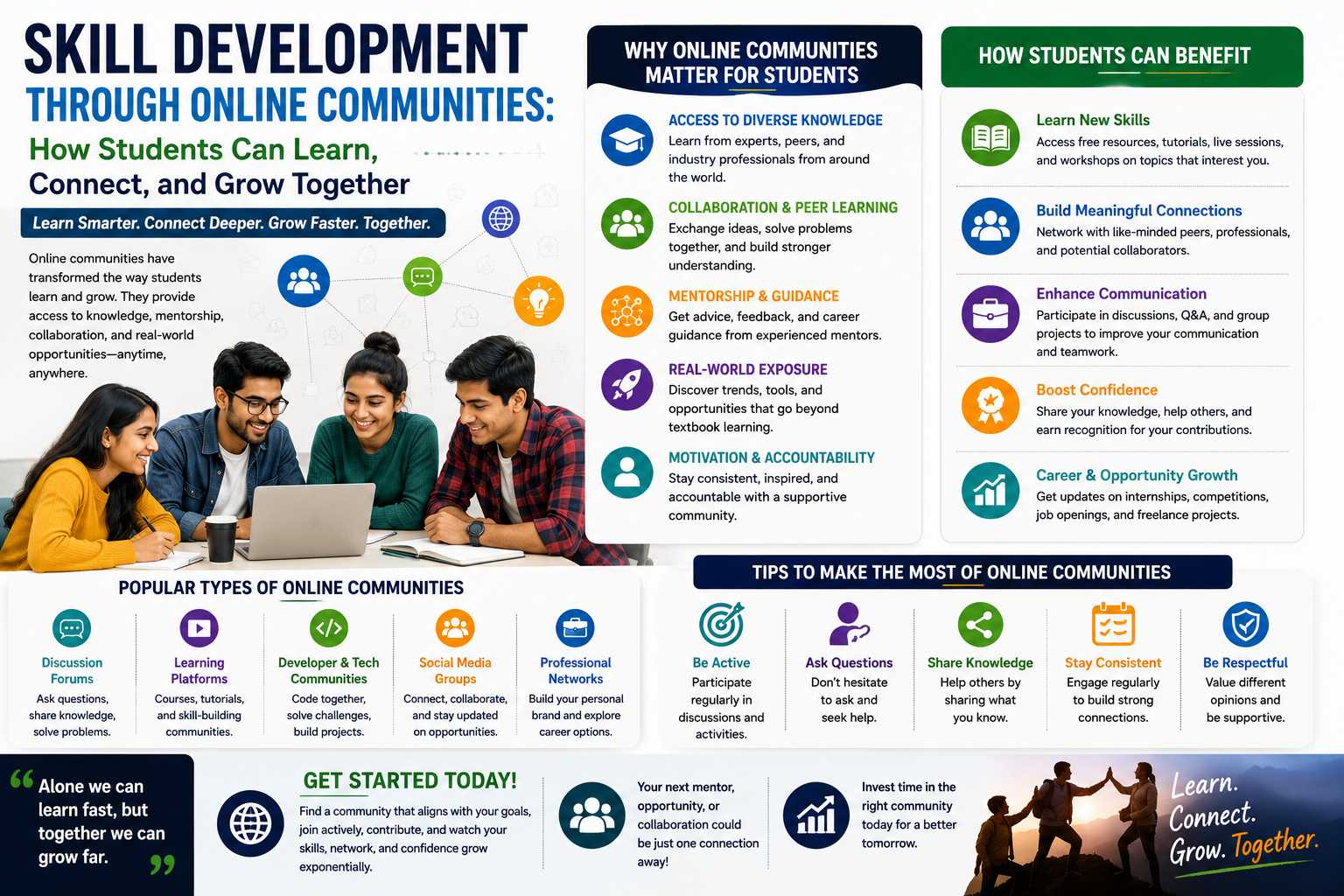
  • Skill Development Through Online Communities: How Students Can Learn, Connect, and Grow Together

    Skill Development Through Online Communities: How Students Can Learn, Connect, and Grow Together

    In today’s digital world, learning is no longer limited to classrooms, libraries, or traditional educational institutions. Students now have access to a vast global network of online communities where they can learn new skills, exchange ideas, ask questions, collaborate on projects, and connect with people who share similar interests. From programming and data science to design, digital marketing, entrepreneurship, and communication, online communities have become valuable spaces for continuous skill development.

    At CVDragon, we believe that students can accelerate their personal and professional growth by becoming active participants in online learning communities. These platforms provide opportunities to learn from experienced professionals, practice skills through real-world discussions, receive feedback, and discover career opportunities. When used effectively, online communities can complement formal education and help students develop the practical skills required to succeed in today’s competitive job market.

    What Are Online Learning Communities?

    Online learning communities are digital spaces where individuals come together to share knowledge, discuss topics, solve problems, and learn from one another. These communities may exist on dedicated learning platforms, professional networks, discussion forums, social media groups, or collaborative platforms.

    Examples include communities focused on:

    • Programming and software development.
    • Data science and artificial intelligence.
    • Digital marketing.
    • Graphic and UI/UX design.
    • Entrepreneurship.
    • Finance and investing.
    • Career development.
    • Language learning.
    • Academic research.

    The key advantage of these communities is that students can interact with people from different backgrounds, industries, and experience levels.

    Why Online Communities Matter for Skill Development

    Traditional education provides students with foundational knowledge, but online communities can help them apply that knowledge in practical environments.

    Participating in online communities allows students to:

    • Learn from experienced professionals.
    • Ask questions and receive feedback.
    • Discover industry trends.
    • Practice problem-solving.
    • Collaborate on projects.
    • Build professional networks.
    • Find mentors.
    • Explore career opportunities.

    This combination of learning and interaction helps students develop skills beyond what they may learn through textbooks or lectures.

    Learn from Industry Professionals

    One of the greatest benefits of online communities is access to people who are already working in the industry.

    Students can follow professionals, read their experiences, participate in discussions, and learn about real-world challenges. This exposure provides insights into how theoretical concepts are applied in professional environments.

    For example, a student interested in cybersecurity can learn from security professionals discussing current threats, while an aspiring digital marketer can follow conversations about SEO, content strategy, and changing consumer behavior.

    Learning directly from professionals helps students develop a clearer understanding of industry expectations.

    Ask Questions and Solve Problems

    Students often hesitate to ask questions in classrooms because they may fear making mistakes or appearing uninformed. Online communities can provide a more flexible environment for asking questions and seeking guidance.

    Whether a student is struggling with a programming error, trying to understand a complex concept, or looking for feedback on a project, online communities often provide valuable support.

    Asking thoughtful questions also improves communication and problem-solving skills. Over time, students learn how to explain problems clearly, evaluate possible solutions, and apply feedback effectively.

    Practice Skills Through Real Discussions

    Skill development requires practice. Reading about a skill is not enough; students need opportunities to apply their knowledge.

    Online communities encourage practical learning through:

    • Technical discussions.
    • Challenges.
    • Case studies.
    • Competitions.
    • Project collaborations.
    • Peer reviews.

    For example, a student learning data analytics might participate in discussions about real datasets and analysis techniques. Similarly, a design student may share a project and receive feedback from other designers.

    This practical interaction strengthens understanding and builds confidence.

    Collaborate on Projects

    Collaboration is an essential workplace skill. Most professional environments require employees to work with colleagues, clients, and stakeholders.

    Online communities provide opportunities to collaborate with people from different locations and backgrounds. Students can work together on:

    • Open-source projects.
    • Research initiatives.
    • Business ideas.
    • Hackathons.
    • Content projects.
    • Design challenges.
    • Technology experiments.

    Collaborative projects help students develop communication, teamwork, leadership, and project management skills.

    Build a Professional Network

    Networking is an important part of career development. Online communities allow students to build relationships long before they enter the workforce.

    Students can connect with:

    • Industry professionals.
    • Recruiters.
    • Entrepreneurs.
    • Researchers.
    • Mentors.
    • Fellow students.
    • Potential collaborators.

    A strong professional network can provide valuable advice, referrals, internship opportunities, and career guidance.

    However, networking should be approached genuinely. Students should focus on contributing to discussions and building meaningful relationships rather than simply asking people for jobs.

    Find Mentors and Role Models

    Mentorship can significantly influence a student’s career journey. Online communities make it easier to discover experienced individuals who are willing to share advice and guidance.

    Students can learn from mentors about:

    • Career paths.
    • Industry expectations.
    • Skill development.
    • Professional challenges.
    • Job preparation.
    • Workplace culture.

    Following the journey of experienced professionals can also help students identify the skills they need to develop to achieve similar career goals.

    Improve Communication Skills

    Online community participation requires students to communicate clearly and professionally.

    Whether writing a question, explaining a solution, giving feedback, or presenting an idea, students practice expressing themselves effectively.

    Over time, this improves:

    • Written communication.
    • Professional etiquette.
    • Active listening.
    • Constructive feedback.
    • Persuasive communication.

    These skills are valuable across almost every career.

    Discover Industry Trends

    Industries are constantly evolving. Technologies, tools, and professional practices that are relevant today may change within a few years.

    Online communities provide real-time exposure to industry conversations and emerging trends. Students can discover:

    • New technologies.
    • Emerging career paths.
    • In-demand skills.
    • Industry challenges.
    • New tools and platforms.

    Staying informed helps students make better decisions about their education and career development.

    Build a Portfolio Through Community Participation

    Online communities can also contribute to a student’s professional portfolio.

    Students can showcase:

    • Projects they contributed to.
    • Open-source work.
    • Technical solutions.
    • Research contributions.
    • Competition achievements.
    • Community leadership roles.

    For example, participating in an open-source project can demonstrate technical skills and collaboration. Organizing a community event can showcase leadership and project management abilities.

    These experiences can strengthen a resume and provide valuable examples during job interviews.

    Learn Through Peer-to-Peer Education

    Learning does not always have to come from teachers or experts. Students can learn a great deal from their peers.

    Peer-to-peer learning allows students to:

    • Exchange different perspectives.
    • Explain concepts to one another.
    • Share resources.
    • Review each other’s work.
    • Solve problems collaboratively.

    Teaching others can also strengthen the student’s own understanding. When you explain a concept clearly, you often discover gaps in your own knowledge.

    Choose the Right Online Communities

    Not every online community provides the same learning value. Students should select communities based on their career interests and learning goals.

    Before joining, consider:

    • Is the community active?
    • Are discussions relevant?
    • Do experienced professionals participate?
    • Is feedback constructive?
    • Are members respectful?
    • Are learning opportunities available?

    Joining a few high-quality communities is often more beneficial than joining dozens of inactive groups.

    Practice Digital Professionalism

    Students should remember that online interactions contribute to their digital reputation.

    Good practices include:

    • Communicating respectfully.
    • Avoiding unnecessary arguments.
    • Giving constructive feedback.
    • Crediting other people’s work.
    • Protecting personal information.
    • Following community guidelines.

    A positive online presence can support future networking and career opportunities.

    Avoid Passive Participation

    Simply joining an online community is not enough. Students should actively participate to gain meaningful benefits.

    Instead of only reading posts, try to:

    • Ask thoughtful questions.
    • Answer questions when possible.
    • Share useful resources.
    • Participate in discussions.
    • Join collaborative projects.
    • Request feedback.
    • Document your learning journey.

    Active participation creates stronger learning outcomes and increases visibility within the community.

    Balance Online Learning with Formal Education

    Online communities should complement formal education rather than completely replace it.

    Students can combine:

    • Academic learning.
    • Online courses.
    • Community discussions.
    • Practical projects.
    • Internships.
    • Certifications.

    This blended approach creates a more complete learning experience by combining theoretical knowledge with practical exposure.

    The Role of Online Communities in Career Readiness

    Employers increasingly value candidates who demonstrate initiative, adaptability, collaboration, and continuous learning. Active participation in professional communities can help students develop these qualities.

    Community-based learning can provide examples of:

    • Problem-solving.
    • Teamwork.
    • Leadership.
    • Communication.
    • Technical skills.
    • Industry awareness.

    These experiences can be highlighted on resumes, portfolios, and during interviews when they are relevant to the target role.

    Conclusion

    Skill development through online communities offers students a powerful way to supplement traditional education and prepare for the modern workplace. By interacting with professionals, collaborating on projects, asking questions, sharing knowledge, and staying informed about industry trends, students can develop practical skills while building valuable professional networks.

    At CVDragon, we encourage students to view online communities as more than social platforms. When approached with curiosity, consistency, and professionalism, they can become valuable environments for learning, networking, mentorship, and career growth. The skills students develop through these communities can strengthen their resumes, expand their portfolios, and improve their confidence when entering the professional world.

    The future of learning is increasingly collaborative and connected. Students who actively participate in meaningful online communities today can build the knowledge, skills, relationships, and professional confidence needed to succeed in tomorrow’s competitive job market.

  • Resume for Executives: How to Create a Powerful Executive Resume That Demonstrates Leadership and Business Impact

    Resume for Executives: How to Create a Powerful Executive Resume That Demonstrates Leadership and Business Impact

    In today’s highly competitive business environment, executive-level positions demand more than extensive experience—they require visionary leadership, strategic thinking, measurable business achievements, and the ability to drive organizational growth. Whether you’re applying for a C-suite position, Vice President role, Director-level opportunity, or another senior leadership position, your resume must immediately communicate your executive value. Unlike a standard resume, an executive resume focuses on transformational leadership, business outcomes, and the ability to influence organizational success.

    At CVDragon, we understand that an executive resume is more than a career summary—it’s a strategic marketing document. It should position you as a results-driven leader capable of making high-level decisions, leading change, managing large teams, and delivering sustainable business growth. A professionally written executive resume can open doors to leadership opportunities, board positions, and global career advancement.

    Why an Executive Resume Is Different

    Recruiters hiring for executive positions are looking beyond technical expertise. They want leaders who can shape business strategy, manage organizational change, improve profitability, build high-performing teams, and deliver measurable outcomes.

    An executive resume should emphasize:

    • Strategic leadership.
    • Business transformation.
    • Revenue growth.
    • Operational excellence.
    • Organizational development.
    • Financial management.
    • Innovation.
    • Stakeholder relationships.
    • Corporate governance.

    Rather than focusing on daily responsibilities, it should clearly demonstrate how your leadership has created long-term business value.

    Start with a Powerful Executive Summary

    The executive summary is the most important section of an executive resume. It serves as your leadership introduction and should immediately communicate your expertise, achievements, and executive capabilities.

    A strong executive summary typically includes:

    • Years of leadership experience.
    • Industry expertise.
    • Executive leadership strengths.
    • Major business achievements.
    • Areas of specialization.
    • Leadership philosophy or value proposition.

    For example:

    “Visionary business executive with over 18 years of experience leading global operations, driving digital transformation, and delivering sustainable revenue growth across multinational organizations. Proven ability to manage large-scale business strategies, optimize operational performance, and build high-performing leadership teams. Recognized for successfully leading organizational change while improving profitability and customer satisfaction.”

    This introduction immediately establishes executive credibility.

    Highlight Executive Core Competencies

    Executive recruiters often scan resumes for leadership competencies that align with organizational goals.

    Examples include:

    Leadership Competencies

    • Strategic Planning
    • Business Development
    • Corporate Governance
    • Organizational Leadership
    • Change Management
    • Executive Decision-Making
    • Talent Development
    • Stakeholder Management
    • Innovation Leadership
    • Business Transformation

    Business Competencies

    • Financial Planning
    • Budget Management
    • Profit and Loss (P&L) Management
    • Risk Management
    • Operational Excellence
    • Business Analytics
    • Market Expansion
    • Mergers and Acquisitions
    • Digital Transformation
    • Performance Optimization

    Present these competencies in a clean, ATS-friendly format to improve visibility.

    Showcase Leadership Achievements Instead of Responsibilities

    One of the most common mistakes executives make is listing responsibilities instead of demonstrating measurable business impact.

    Instead of writing:

    • Managed company operations.

    Write:

    • Directed enterprise-wide operations across five regional offices, increasing annual revenue by 32%, reducing operational costs by 18%, and improving customer satisfaction scores through strategic process improvements.

    Executive resumes should focus on results, innovation, and leadership outcomes rather than routine duties.

    Demonstrate Business Impact with Metrics

    Numbers provide strong evidence of leadership effectiveness. Quantifiable achievements help recruiters understand the scale and significance of your contributions.

    Examples include:

    • Increased annual revenue by 45%.
    • Managed budgets exceeding $100 million.
    • Led teams of over 500 employees.
    • Reduced operational expenses by 20%.
    • Expanded business operations into 12 international markets.
    • Improved employee engagement by 28%.
    • Delivered digital transformation initiatives ahead of schedule.

    Metrics strengthen credibility and clearly illustrate executive performance.

    Highlight Strategic Leadership Experience

    Organizations hire executives to shape long-term business success. Your resume should demonstrate strategic leadership through real examples.

    Include achievements related to:

    • Business expansion.
    • Organizational restructuring.
    • Market growth.
    • Corporate strategy.
    • Product innovation.
    • Strategic partnerships.
    • Digital transformation.
    • Customer experience improvements.
    • Operational efficiency.
    • Sustainability initiatives.

    Focus on initiatives that influenced overall business performance rather than departmental activities.

    Showcase Experience Managing People and Organizations

    Leadership at the executive level extends beyond managing teams—it involves developing future leaders and creating high-performing organizations.

    Highlight experience such as:

    • Leading executive teams.
    • Managing multiple departments.
    • Building leadership pipelines.
    • Mentoring senior managers.
    • Driving organizational culture.
    • Leading cross-functional initiatives.
    • Improving workforce performance.

    Employers seek executives who can inspire teams and create lasting organizational success.

    Include Major Strategic Projects

    Large-scale projects often define executive careers. Dedicate a section to major initiatives that demonstrate leadership and business impact.

    Examples include:

    • Enterprise digital transformation.
    • Global market expansion.
    • Company mergers or acquisitions.
    • ERP implementation.
    • Business restructuring.
    • Customer experience transformation.
    • Sustainability programs.
    • Innovation initiatives.

    For each project, explain the objective, your leadership role, and measurable business outcomes.

    Highlight Education and Executive Certifications

    While experience carries significant weight, education and executive training reinforce your leadership profile.

    Include:

    • MBA or relevant postgraduate degrees.
    • Executive leadership programs.
    • Project Management certifications.
    • Lean Six Sigma.
    • Corporate governance certifications.
    • Financial management qualifications.
    • Industry-specific executive certifications.

    Continuous learning demonstrates commitment to leadership excellence.

    Optimize for Applicant Tracking Systems (ATS)

    Many executive search firms and organizations use Applicant Tracking Systems before resumes reach hiring executives.

    To improve ATS compatibility:

    • Use standard section headings.
    • Include leadership and industry-specific keywords.
    • Avoid graphics and complex formatting.
    • Use professional fonts.
    • Maintain consistent formatting throughout.
    • Save the resume in the requested format.

    An ATS-friendly executive resume increases visibility and improves the likelihood of being shortlisted.

    Build a Strong Executive Brand

    Your resume should consistently communicate your executive identity.

    Consider emphasizing strengths such as:

    • Visionary leadership.
    • Business transformation.
    • Innovation.
    • Revenue growth.
    • Operational excellence.
    • Global business experience.
    • Customer-centric leadership.
    • Digital innovation.
    • Organizational culture development.

    A consistent personal brand helps recruiters quickly understand your leadership style and expertise.

    Tailor Your Resume for Each Executive Opportunity

    Even experienced executives should customize their resumes for every role.

    Review the job description carefully and adjust:

    • Executive summary.
    • Leadership achievements.
    • Core competencies.
    • Business metrics.
    • Industry-specific keywords.

    Tailoring your resume demonstrates strategic thinking and ensures greater alignment with employer expectations.

    Common Mistakes Executive Candidates Should Avoid

    Even senior professionals can reduce their chances of success by making avoidable resume mistakes.

    Common errors include:

    • Listing responsibilities instead of achievements.
    • Writing lengthy career histories without measurable outcomes.
    • Using outdated resume formats.
    • Ignoring ATS optimization.
    • Including irrelevant early-career experience.
    • Using vague leadership statements.
    • Failing to demonstrate strategic impact.

    A concise, achievement-focused resume creates a stronger executive presence.

    Support Your Resume with Additional Executive Assets

    An executive resume becomes even more compelling when supported by complementary professional materials.

    Consider including or maintaining:

    • An optimized LinkedIn profile.
    • Executive biography.
    • Professional portfolio.
    • Board memberships.
    • Industry publications.
    • Speaking engagements.
    • Awards and recognitions.
    • Professional affiliations.

    These elements strengthen your executive profile and reinforce your leadership credibility.

    Preparing for Executive Interviews

    A well-written resume also serves as a roadmap for executive interviews. Be prepared to discuss the achievements, metrics, and leadership initiatives highlighted in your resume.

    Focus on explaining:

    • Strategic decisions you made.
    • Business challenges you overcame.
    • Organizational transformations you led.
    • Financial results you achieved.
    • Leadership philosophy.
    • Vision for future growth.

    Consistency between your resume and interview responses builds trust and confidence with hiring organizations.

    How CVDragon Helps Executives Build Winning Resumes

    Creating an executive resume requires a strategic approach that goes beyond traditional resume writing. CVDragon specializes in developing ATS-friendly, leadership-focused resumes that highlight executive achievements, measurable business impact, and strategic expertise. By presenting accomplishments with clarity and precision, CVDragon helps senior professionals position themselves for leadership opportunities across industries.

    Whether you are pursuing a C-suite role, executive promotion, or international leadership opportunity, a professionally crafted resume can become one of your strongest career assets.

    Conclusion

    An executive resume is far more than a summary of your career—it is a strategic representation of your leadership journey, business achievements, and organizational impact. By emphasizing measurable results, strategic initiatives, executive competencies, and leadership accomplishments, you can demonstrate your readiness to guide organizations through growth, innovation, and transformation. A well-structured, ATS-friendly executive resume positions you as a confident, capable leader who delivers meaningful business outcomes.

    At CVDragon, we believe every executive has a unique leadership story worth showcasing. Whether you’re advancing to a higher executive role, transitioning into a new industry, or pursuing global leadership opportunities, your resume should clearly communicate the value you bring to an organization. With the right strategy and presentation, your executive resume can become the key to unlocking the next stage of your professional journey.

  • How to Write a Compelling Resume Summary That Hooks Recruiters in 6 Seconds

    How to Write a Compelling Resume Summary That Hooks Recruiters in 6 Seconds

    Landing an internship is one of the most important milestones in a student’s career journey. It provides valuable hands-on experience, helps develop industry-specific skills, expands professional networks, and often serves as a gateway to full-time employment. However, with thousands of students applying for limited internship opportunities, standing out requires more than just good academic performance. A well-crafted internship resume can significantly increase your chances of getting noticed by recruiters.

    At CVDragon, we believe that every student has the potential to build an impressive resume, even without extensive work experience. An internship resume should focus on your education, skills, projects, achievements, certifications, and willingness to learn. It should present your strengths in a professional and organized manner while demonstrating your readiness to contribute to an organization. This step-by-step guide will help you create an internship resume that captures employers’ attention and improves your chances of securing valuable internship opportunities.

    Why an Internship Resume Is Important

    An internship resume is often the first interaction a recruiter has with you. Since most students have limited professional experience, recruiters look for evidence of potential rather than years of employment.

    A strong internship resume helps you:

    • Make a positive first impression.
    • Showcase your academic background.
    • Highlight relevant skills.
    • Demonstrate practical experience through projects.
    • Present certifications and extracurricular achievements.
    • Improve your chances of passing Applicant Tracking Systems (ATS).
    • Secure interviews for internship opportunities.

    A professional resume communicates that you are serious about your career and prepared to learn in a professional environment.

    Step 1: Understand the Internship Requirements

    Before writing your resume, carefully read the internship description. Every company looks for different qualifications, skills, and competencies.

    Identify:

    • Required technical skills.
    • Preferred soft skills.
    • Educational qualifications.
    • Industry keywords.
    • Key responsibilities.
    • Desired certifications.

    Tailoring your resume to match these requirements increases your chances of getting shortlisted.

    Step 2: Add Professional Contact Information

    Begin your resume with accurate and professional contact details.

    Include:

    • Full name.
    • Mobile number.
    • Professional email address.
    • City and state.
    • LinkedIn profile (if updated).
    • Portfolio or GitHub link (if relevant).

    Avoid using unprofessional email addresses, as they can create a negative impression.

    Step 3: Write a Strong Career Objective

    Since most internship applicants have limited work experience, a career objective helps explain your goals and enthusiasm.

    An effective objective should mention:

    • Your educational background.
    • Career interests.
    • Relevant skills.
    • Willingness to learn.
    • Value you can bring to the organization.

    Example:

    “Motivated Computer Science student with a strong foundation in programming, problem-solving, and software development. Seeking an internship opportunity to apply technical skills, gain practical industry experience, and contribute to innovative projects while continuing to grow professionally.”

    Keep the objective concise, relevant, and tailored to the internship.

    Step 4: Highlight Your Educational Background

    For students, education is one of the strongest sections of the resume.

    Include:

    • Degree or course name.
    • College or university.
    • Expected graduation year.
    • Percentage or CGPA (if strong).
    • Relevant coursework.

    If you have received academic awards or scholarships, include them to strengthen your profile.

    Step 5: Showcase Relevant Skills

    Recruiters want interns who possess both technical and interpersonal skills.

    Technical Skills

    Examples include:

    • Programming languages.
    • Microsoft Excel.
    • Data analysis.
    • Graphic design.
    • Digital marketing.
    • Web development.
    • SQL.
    • Python.
    • Java.
    • Canva.
    • Power BI.

    Soft Skills

    Include skills such as:

    • Communication.
    • Teamwork.
    • Problem-solving.
    • Adaptability.
    • Time management.
    • Critical thinking.
    • Creativity.
    • Leadership.
    • Attention to detail.

    Choose skills that are relevant to the internship you are applying for.

    Step 6: Add Academic and Personal Projects

    Projects demonstrate your ability to apply classroom knowledge to practical situations.

    Include:

    • Project title.
    • Objective.
    • Your role.
    • Tools or technologies used.
    • Key outcomes.

    For example:

    Student Attendance Management System

    • Developed a web-based attendance system using Python and SQL.
    • Improved attendance tracking accuracy.
    • Designed a user-friendly interface for teachers and students.

    Projects help compensate for limited work experience and showcase practical abilities.

    Step 7: Include Certifications

    Professional certifications demonstrate initiative and continuous learning.

    Examples include:

    • Digital Marketing Certification.
    • Data Analytics Certification.
    • Python Programming.
    • Artificial Intelligence Fundamentals.
    • Cybersecurity Basics.
    • Financial Modeling.
    • Cloud Computing.
    • Excel Advanced.
    • Project Management.

    Relevant certifications strengthen your internship application and improve employability.

    Step 8: Highlight Extracurricular Activities

    Employers appreciate students who actively participate beyond academics.

    Examples include:

    • Student leadership positions.
    • College clubs.
    • Volunteer work.
    • Sports achievements.
    • Cultural events.
    • Technical competitions.
    • Debate competitions.
    • Event management.

    These activities demonstrate leadership, teamwork, and organizational skills.

    Step 9: Mention Internships or Volunteer Experience

    If you have completed any previous internships, part-time jobs, freelancing assignments, or volunteer work, include them even if they are unrelated.

    Focus on transferable skills such as:

    • Communication.
    • Teamwork.
    • Customer service.
    • Leadership.
    • Organization.
    • Problem-solving.

    Every professional experience contributes to your overall profile.

    Step 10: Optimize Your Resume for ATS

    Many organizations use Applicant Tracking Systems to filter resumes before recruiters review them.

    To improve ATS compatibility:

    • Use standard headings such as Education, Skills, Projects, and Certifications.
    • Include keywords from the internship description.
    • Avoid graphics and tables.
    • Use simple fonts.
    • Save the file in the requested format.
    • Maintain consistent formatting.

    An ATS-friendly resume increases your chances of reaching the hiring manager.

    Step 11: Keep the Design Professional

    A clean and organized resume is easier to read and leaves a better impression.

    Best practices include:

    • One-page resume for most students.
    • Clear headings.
    • Consistent font style.
    • Adequate spacing.
    • Bullet points for readability.
    • Professional formatting.

    Avoid unnecessary colors, graphics, or decorative elements unless applying for creative roles.

    Step 12: Proofread Carefully

    Small mistakes can reduce your credibility.

    Before submitting your resume:

    • Check spelling and grammar.
    • Verify dates and contact details.
    • Ensure consistent formatting.
    • Remove unnecessary information.
    • Confirm that all links work correctly.

    A polished resume reflects professionalism and attention to detail.

    Common Mistakes Students Should Avoid

    Many internship applicants unintentionally weaken their resumes by making avoidable errors.

    Common mistakes include:

    • Using generic career objectives.
    • Listing irrelevant information.
    • Including too many skills without evidence.
    • Ignoring projects and certifications.
    • Using unprofessional email addresses.
    • Sending the same resume to every company.
    • Failing to tailor the resume for the internship.
    • Submitting resumes with spelling or formatting errors.

    Avoiding these mistakes significantly improves the quality of your application.

    Additional Tips to Strengthen Your Internship Resume

    To make your resume even more competitive:

    • Build a professional LinkedIn profile.
    • Create an online portfolio if relevant.
    • Participate in hackathons and competitions.
    • Publish personal projects on GitHub.
    • Complete industry-recognized certifications.
    • Learn in-demand digital skills.
    • Join student organizations.
    • Stay updated with industry trends.

    These efforts demonstrate initiative and make your profile more attractive to recruiters.

    How CVDragon Helps Students Build Winning Internship Resumes

    Creating an internship resume can feel overwhelming, especially for students with limited experience. CVDragon simplifies the process by helping students design professional, ATS-friendly resumes that highlight their strengths effectively. From selecting the right format to showcasing projects, certifications, and skills, CVDragon empowers students to present themselves confidently to employers.

    Whether you are applying for your first internship or aiming for a prestigious organization, a well-crafted resume can make a significant difference in your career journey.

    Conclusion

    An internship resume is much more than a summary of your education—it is your opportunity to demonstrate potential, enthusiasm, and readiness to learn. By understanding the internship requirements, highlighting relevant skills, showcasing projects, earning certifications, and optimizing your resume for ATS, you can create a document that captures recruiters’ attention and increases your chances of securing valuable internship opportunities.

    At CVDragon, we encourage students to start building strong resumes early in their academic journey. Every project completed, certification earned, competition entered, and skill developed adds value to your professional profile. With the right preparation and a thoughtfully crafted internship resume, you can confidently take the first step toward building a successful and rewarding career.

  • 7 Critical Resume Mistakes That Turn Off Recruiters (And How Students Can Fix Them)

    7 Critical Resume Mistakes That Turn Off Recruiters (And How Students Can Fix Them)

    Your resume is your personal marketing document. It introduces your skills, education, achievements, and potential to employers before you ever get the chance to speak with them. For students and fresh graduates, a well-crafted resume can open doors to internships, campus placements, and entry-level jobs. However, even talented candidates are often overlooked because of avoidable resume mistakes.

    Recruiters typically spend just a few seconds scanning each resume during the initial screening process. If your resume is cluttered, difficult to read, or filled with generic content, it may never make it to the interview stage. The good news is that most resume mistakes are easy to fix once you know what recruiters are looking for.

    At cvDragon, we help students create professional, ATS-friendly resumes that highlight their strengths and maximize their chances of getting shortlisted. In this guide, we’ll explore seven critical resume mistakes that turn off recruiters—and, more importantly, how you can fix them.

    Mistake 1: Using the Same Resume for Every Job

    One of the most common mistakes students make is sending the exact same resume to every employer. While it may save time, a generic resume rarely stands out because every company is looking for a slightly different combination of skills and qualifications.

    Recruiters want to see that you’ve taken the time to understand the role and align your experience with the job description.

    How to Fix It

    Customize your resume for each application by:

    • Updating your professional summary.
    • Including keywords from the job description.
    • Highlighting the most relevant projects.
    • Rearranging your skills based on the role.
    • Prioritizing certifications that match the position.

    A tailored resume significantly increases your chances of passing Applicant Tracking Systems (ATS) and catching the recruiter’s attention.

    Mistake 2: Writing Responsibilities Instead of Achievements

    Many student resumes contain bullet points like:

    • Responsible for organizing events
    • Worked on a website
    • Assisted with marketing
    • Helped manage social media

    These statements describe tasks but fail to show the value you created.

    Recruiters are far more interested in results than responsibilities.

    How to Fix It

    Use action verbs and measurable achievements whenever possible.

    Instead of:

    “Responsible for organizing a technical workshop.”

    Write:

    “Organized a technical workshop attended by 250+ students by coordinating speakers, managing registrations, and promoting the event across campus.”

    Whenever possible, include numbers, percentages, or measurable outcomes to strengthen your resume.

    Mistake 3: Ignoring ATS-Friendly Formatting

    Many companies use Applicant Tracking Systems to organize and search resumes. Complex layouts, graphics, tables, and decorative designs can make it difficult for ATS software to read your information accurately.

    A visually attractive resume isn’t helpful if the software cannot interpret it.

    How to Fix It

    Create a clean and professional layout by:

    • Using a single-column format.
    • Choosing standard fonts like Arial, Calibri, or Times New Roman.
    • Using clear section headings such as Education, Skills, Projects, and Certifications.
    • Avoiding graphics, icons, text boxes, and excessive colors.
    • Saving your resume in the format requested by the employer.

    Simple formatting improves readability for both ATS software and recruiters.

    Mistake 4: Listing Skills Without Proof

    Many resumes include a long list of skills but provide no evidence that the candidate can actually use them.

    For example:

    • Leadership
    • Communication
    • Python
    • Teamwork
    • Problem Solving

    Without supporting examples, these skills may appear generic.

    How to Fix It

    Demonstrate your skills through projects, internships, competitions, volunteer work, or leadership experiences.

    For example:

    “Developed a Python-based inventory management application that reduced manual data entry during an academic project.”

    Or:

    “Led a team of six students during a national hackathon to design a mobile healthcare solution.”

    Showing how you’ve applied your skills makes them more believable and impactful.

    Mistake 5: Including Irrelevant or Outdated Information

    Students sometimes fill their resumes with information that doesn’t add value, such as:

    • Primary school achievements
    • Irrelevant hobbies
    • Unrelated certifications
    • Excessive personal details
    • Old awards that no longer reflect current abilities

    This takes attention away from your strongest qualifications.

    How to Fix It

    Focus on information that supports the position you’re applying for.

    Include:

    • Relevant academic projects
    • Recent certifications
    • Technical skills
    • Leadership roles
    • Volunteer experience
    • College achievements
    • Internships
    • Industry-related competitions

    Every section should strengthen your application.

    Mistake 6: Poor Grammar, Spelling, and Formatting

    Even small mistakes can create a negative impression. Recruiters often view grammatical errors and inconsistent formatting as signs of carelessness or a lack of attention to detail.

    Common issues include:

    • Misspelled words
    • Inconsistent bullet points
    • Uneven spacing
    • Mixed fonts
    • Incorrect dates
    • Broken hyperlinks

    These errors can make an otherwise strong resume look unprofessional.

    How to Fix It

    Before submitting your resume:

    • Proofread it multiple times.
    • Use spelling and grammar tools.
    • Ask a mentor, professor, or friend to review it.
    • Verify all contact information.
    • Test LinkedIn and portfolio links.
    • Check that dates and formatting are consistent.

    A polished resume reflects professionalism and attention to detail.

    Mistake 7: Writing a Weak Professional Summary

    Many students either skip the professional summary altogether or write vague objective statements such as:

    “Looking for a challenging position where I can grow.”

    This tells recruiters very little about your qualifications.

    How to Fix It

    Write a concise professional summary that highlights your strengths, education, skills, and career goals.

    For example:

    “Motivated Mechanical Engineering student with strong analytical skills and hands-on experience in CAD design, academic engineering projects, and robotics competitions. Passionate about product development and eager to contribute to innovative engineering teams.”

    A strong summary encourages recruiters to continue reading your resume.

    Bonus Tips to Make Your Resume Stand Out

    Beyond avoiding these seven mistakes, here are a few additional strategies that can improve your resume:

    • Keep your resume to one page if you’re a student or recent graduate.
    • Start bullet points with strong action verbs such as Developed, Designed, Led, Implemented, and Analyzed.
    • Quantify achievements wherever possible.
    • Include relevant certifications and online courses.
    • Showcase academic projects that demonstrate practical skills.
    • Add leadership roles from clubs, events, or student organizations.
    • Tailor your resume for every internship or job application.

    These small improvements can make a significant difference in how recruiters perceive your application.

    Resume Review Checklist

    Before submitting your resume, ask yourself:

    • Is it customized for the specific job?
    • Does it use relevant keywords from the job description?
    • Are achievements highlighted instead of responsibilities?
    • Is the formatting simple and ATS-friendly?
    • Are skills supported with real examples?
    • Is all information relevant and up to date?
    • Have I checked for grammar and spelling errors?
    • Does the professional summary clearly communicate my strengths?

    If you can answer “yes” to all these questions, your resume is in excellent shape.

    Final Thoughts

    Your resume doesn’t need years of professional experience to impress recruiters—it needs clarity, relevance, and evidence of your potential. By avoiding these seven common mistakes, you can transform your resume into a powerful document that showcases your abilities, achievements, and readiness for the workplace.

    Remember that recruiters are looking for candidates who demonstrate initiative, problem-solving skills, continuous learning, and a genuine interest in the role. Whether you’re applying for your first internship or preparing for campus placements, a well-structured, ATS-friendly resume can significantly improve your chances of getting noticed.

    At cvDragon, we specialize in helping students create professional resumes that stand out to both Applicant Tracking Systems and hiring managers. With the right strategy, attention to detail, and a focus on achievements, your resume can become the first step toward a successful and rewarding career.

  • The Step-by-Step Guide to Crafting a Resume Specifically for Internship Applications

    The Step-by-Step Guide to Crafting a Resume Specifically for Internship Applications

    Landing an internship is one of the most important milestones in a student’s career journey. It provides valuable hands-on experience, helps develop industry-specific skills, expands professional networks, and often serves as a gateway to full-time employment. However, with thousands of students applying for limited internship opportunities, standing out requires more than just good academic performance. A well-crafted internship resume can significantly increase your chances of getting noticed by recruiters.

    At CVDragon, we believe that every student has the potential to build an impressive resume, even without extensive work experience. An internship resume should focus on your education, skills, projects, achievements, certifications, and willingness to learn. It should present your strengths in a professional and organized manner while demonstrating your readiness to contribute to an organization. This step-by-step guide will help you create an internship resume that captures employers’ attention and improves your chances of securing valuable internship opportunities.

    Why an Internship Resume Is Important

    An internship resume is often the first interaction a recruiter has with you. Since most students have limited professional experience, recruiters look for evidence of potential rather than years of employment.

    A strong internship resume helps you:

    • Make a positive first impression.
    • Showcase your academic background.
    • Highlight relevant skills.
    • Demonstrate practical experience through projects.
    • Present certifications and extracurricular achievements.
    • Improve your chances of passing Applicant Tracking Systems (ATS).
    • Secure interviews for internship opportunities.

    A professional resume communicates that you are serious about your career and prepared to learn in a professional environment.

    Step 1: Understand the Internship Requirements

    Before writing your resume, carefully read the internship description. Every company looks for different qualifications, skills, and competencies.

    Identify:

    • Required technical skills.
    • Preferred soft skills.
    • Educational qualifications.
    • Industry keywords.
    • Key responsibilities.
    • Desired certifications.

    Tailoring your resume to match these requirements increases your chances of getting shortlisted.

    Step 2: Add Professional Contact Information

    Begin your resume with accurate and professional contact details.

    Include:

    • Full name.
    • Mobile number.
    • Professional email address.
    • City and state.
    • LinkedIn profile (if updated).
    • Portfolio or GitHub link (if relevant).

    Avoid using unprofessional email addresses, as they can create a negative impression.

    Step 3: Write a Strong Career Objective

    Since most internship applicants have limited work experience, a career objective helps explain your goals and enthusiasm.

    An effective objective should mention:

    • Your educational background.
    • Career interests.
    • Relevant skills.
    • Willingness to learn.
    • Value you can bring to the organization.

    Example:

    “Motivated Computer Science student with a strong foundation in programming, problem-solving, and software development. Seeking an internship opportunity to apply technical skills, gain practical industry experience, and contribute to innovative projects while continuing to grow professionally.”

    Keep the objective concise, relevant, and tailored to the internship.

    Step 4: Highlight Your Educational Background

    For students, education is one of the strongest sections of the resume.

    Include:

    • Degree or course name.
    • College or university.
    • Expected graduation year.
    • Percentage or CGPA (if strong).
    • Relevant coursework.

    If you have received academic awards or scholarships, include them to strengthen your profile.

    Step 5: Showcase Relevant Skills

    Recruiters want interns who possess both technical and interpersonal skills.

    Technical Skills

    Examples include:

    • Programming languages.
    • Microsoft Excel.
    • Data analysis.
    • Graphic design.
    • Digital marketing.
    • Web development.
    • SQL.
    • Python.
    • Java.
    • Canva.
    • Power BI.

    Soft Skills

    Include skills such as:

    • Communication.
    • Teamwork.
    • Problem-solving.
    • Adaptability.
    • Time management.
    • Critical thinking.
    • Creativity.
    • Leadership.
    • Attention to detail.

    Choose skills that are relevant to the internship you are applying for.

    Step 6: Add Academic and Personal Projects

    Projects demonstrate your ability to apply classroom knowledge to practical situations.

    Include:

    • Project title.
    • Objective.
    • Your role.
    • Tools or technologies used.
    • Key outcomes.

    For example:

    Student Attendance Management System

    • Developed a web-based attendance system using Python and SQL.
    • Improved attendance tracking accuracy.
    • Designed a user-friendly interface for teachers and students.

    Projects help compensate for limited work experience and showcase practical abilities.

    Step 7: Include Certifications

    Professional certifications demonstrate initiative and continuous learning.

    Examples include:

    • Digital Marketing Certification.
    • Data Analytics Certification.
    • Python Programming.
    • Artificial Intelligence Fundamentals.
    • Cybersecurity Basics.
    • Financial Modeling.
    • Cloud Computing.
    • Excel Advanced.
    • Project Management.

    Relevant certifications strengthen your internship application and improve employability.

    Step 8: Highlight Extracurricular Activities

    Employers appreciate students who actively participate beyond academics.

    Examples include:

    • Student leadership positions.
    • College clubs.
    • Volunteer work.
    • Sports achievements.
    • Cultural events.
    • Technical competitions.
    • Debate competitions.
    • Event management.

    These activities demonstrate leadership, teamwork, and organizational skills.

    Step 9: Mention Internships or Volunteer Experience

    If you have completed any previous internships, part-time jobs, freelancing assignments, or volunteer work, include them even if they are unrelated.

    Focus on transferable skills such as:

    • Communication.
    • Teamwork.
    • Customer service.
    • Leadership.
    • Organization.
    • Problem-solving.

    Every professional experience contributes to your overall profile.

    Step 10: Optimize Your Resume for ATS

    Many organizations use Applicant Tracking Systems to filter resumes before recruiters review them.

    To improve ATS compatibility:

    • Use standard headings such as Education, Skills, Projects, and Certifications.
    • Include keywords from the internship description.
    • Avoid graphics and tables.
    • Use simple fonts.
    • Save the file in the requested format.
    • Maintain consistent formatting.

    An ATS-friendly resume increases your chances of reaching the hiring manager.

    Step 11: Keep the Design Professional

    A clean and organized resume is easier to read and leaves a better impression.

    Best practices include:

    • One-page resume for most students.
    • Clear headings.
    • Consistent font style.
    • Adequate spacing.
    • Bullet points for readability.
    • Professional formatting.

    Avoid unnecessary colors, graphics, or decorative elements unless applying for creative roles.

    Step 12: Proofread Carefully

    Small mistakes can reduce your credibility.

    Before submitting your resume:

    • Check spelling and grammar.
    • Verify dates and contact details.
    • Ensure consistent formatting.
    • Remove unnecessary information.
    • Confirm that all links work correctly.

    A polished resume reflects professionalism and attention to detail.

    Common Mistakes Students Should Avoid

    Many internship applicants unintentionally weaken their resumes by making avoidable errors.

    Common mistakes include:

    • Using generic career objectives.
    • Listing irrelevant information.
    • Including too many skills without evidence.
    • Ignoring projects and certifications.
    • Using unprofessional email addresses.
    • Sending the same resume to every company.
    • Failing to tailor the resume for the internship.
    • Submitting resumes with spelling or formatting errors.

    Avoiding these mistakes significantly improves the quality of your application.

    Additional Tips to Strengthen Your Internship Resume

    To make your resume even more competitive:

    • Build a professional LinkedIn profile.
    • Create an online portfolio if relevant.
    • Participate in hackathons and competitions.
    • Publish personal projects on GitHub.
    • Complete industry-recognized certifications.
    • Learn in-demand digital skills.
    • Join student organizations.
    • Stay updated with industry trends.

    These efforts demonstrate initiative and make your profile more attractive to recruiters.

    How CVDragon Helps Students Build Winning Internship Resumes

    Creating an internship resume can feel overwhelming, especially for students with limited experience. CVDragon simplifies the process by helping students design professional, ATS-friendly resumes that highlight their strengths effectively. From selecting the right format to showcasing projects, certifications, and skills, CVDragon empowers students to present themselves confidently to employers.

    Whether you are applying for your first internship or aiming for a prestigious organization, a well-crafted resume can make a significant difference in your career journey.

    Conclusion

    An internship resume is much more than a summary of your education—it is your opportunity to demonstrate potential, enthusiasm, and readiness to learn. By understanding the internship requirements, highlighting relevant skills, showcasing projects, earning certifications, and optimizing your resume for ATS, you can create a document that captures recruiters’ attention and increases your chances of securing valuable internship opportunities.

    At CVDragon, we encourage students to start building strong resumes early in their academic journey. Every project completed, certification earned, competition entered, and skill developed adds value to your professional profile. With the right preparation and a thoughtfully crafted internship resume, you can confidently take the first step toward building a successful and rewarding career.