Category: Articles

  • ATS vs Recruiter Review

    ATS vs Recruiter Review

    When applying for jobs online, your resume usually goes through two important stages before you get shortlisted: the Applicant Tracking System (ATS) and the recruiter review. Many job seekers focus only on one side of the process, but success depends on optimizing your resume for both.

    Understanding the difference between ATS vs recruiter review can help you create a resume that passes automated screening while still impressing human recruiters.

    At CvDragon, we guide candidates in building resumes that balance technology and human readability effectively.

    What Is ATS?

    An Applicant Tracking System (ATS) is software used by companies to collect, organize, filter, and rank job applications.

    Popular ATS platforms include:

    • Workday
    • Greenhouse
    • Lever

    ATS acts as the first screening layer before a recruiter sees your resume.

    What Does ATS Do?

    ATS systems:

    • Scan resumes for keywords
    • Parse resume content
    • Rank applications
    • Filter unqualified candidates
    • Organize applicant data

    The software checks whether your resume matches the job description.

    If your resume performs well, it moves to the next stage.

    What Is Recruiter Review?

    After passing ATS, your resume is reviewed by a human recruiter or hiring manager.

    Unlike ATS, recruiters focus on:

    • Overall impression
    • Achievements
    • Experience quality
    • Career progression
    • Communication clarity
    • Professional presentation

    Recruiters evaluate whether you are genuinely suitable for the role.

    Key Difference Between ATS and Recruiter Review

    ATS Focuses on Technical Matching

    ATS looks for:

    • Keywords
    • Skills
    • Job titles
    • Formatting compatibility

    It uses algorithms and automated screening.

    Recruiters Focus on Human Value

    Recruiters assess:

    • Impact and achievements
    • Communication quality
    • Relevance of experience
    • Career potential
    • Personality indicators

    They evaluate the story behind the resume.

    How ATS Reads Your Resume

    ATS systems scan resumes section by section.

    They identify:

    • Contact details
    • Skills
    • Education
    • Work experience

    The system compares your resume with the job description.

    For example:

    If the role requires:

    • SEO
    • Data Analysis
    • Project Management

    ATS searches for these terms in your resume.

    Missing keywords can reduce your ranking.

    How Recruiters Read Your Resume

    Recruiters usually scan resumes quickly—often within a few seconds initially.

    They focus on:

    • Resume summary
    • Key achievements
    • Recent experience
    • Measurable results
    • Overall readability

    Recruiters want clear evidence that you can solve problems and add value.

    ATS-Friendly vs Recruiter-Friendly Resume

    A strong resume should satisfy both systems.

    ATS-Friendly Features

    ✔ Standard headings
    ✔ Relevant keywords
    ✔ Simple formatting
    ✔ Bullet points
    ✔ Single-column layout

    Recruiter-Friendly Features

    ✔ Clear achievements
    ✔ Professional appearance
    ✔ Strong summary
    ✔ Easy readability
    ✔ Quantified results

    The best resumes combine both approaches.

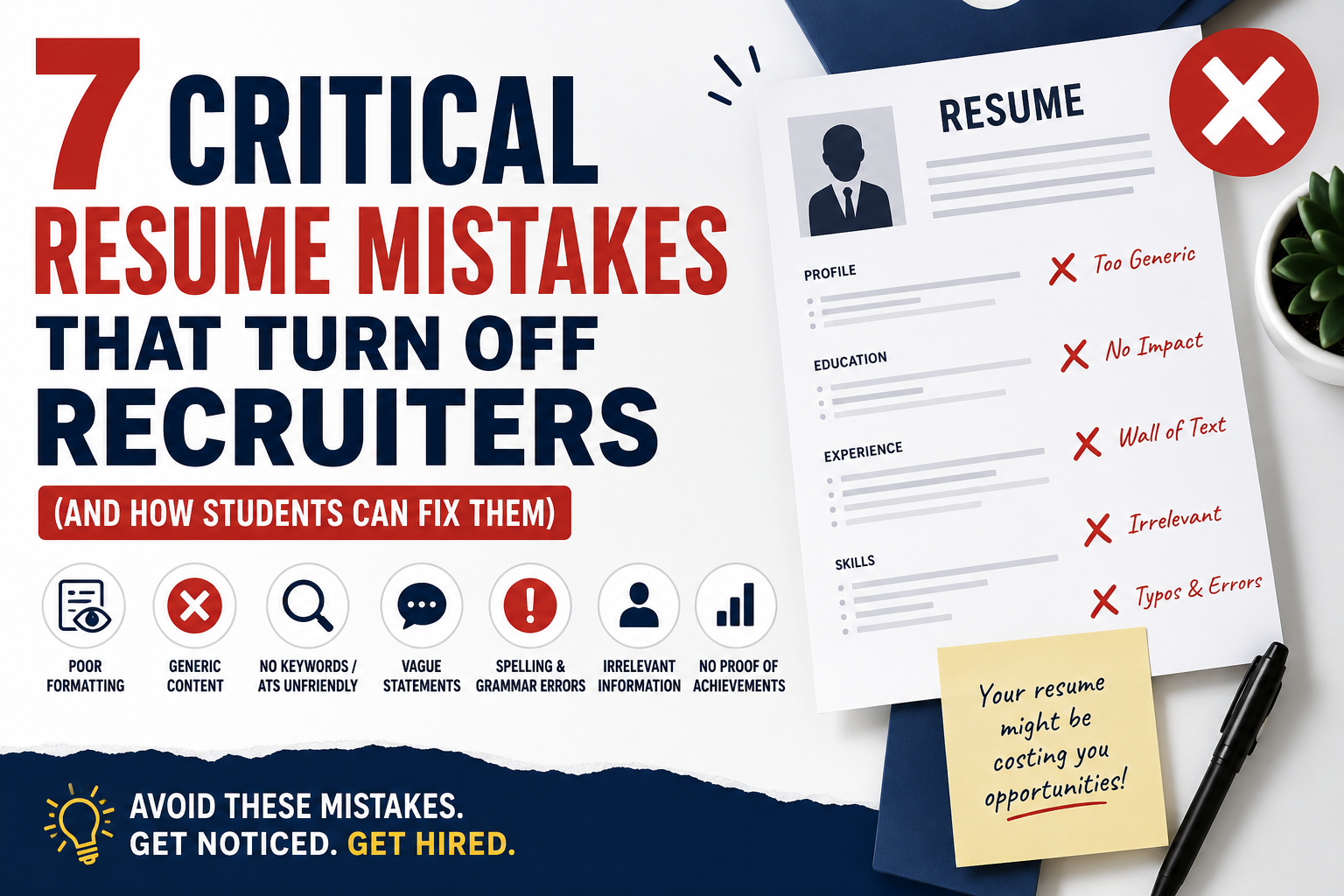
    Common ATS Mistakes

    Many resumes fail ATS screening due to:

    • Missing keywords
    • Complex formatting
    • Tables and graphics
    • Unusual section headings
    • Keyword stuffing

    Even strong candidates can get rejected if the ATS cannot read the resume properly.

    Common Recruiter Rejection Reasons

    Even after passing ATS, recruiters may reject resumes because of:

    • Weak achievements
    • Poor grammar
    • Generic content
    • Lack of relevance
    • Long paragraphs
    • Unclear career direction

    Passing ATS does not guarantee interviews.

    Example of ATS vs Recruiter Perspective

    ATS Perspective

    The system checks:

    ✔ Does the resume contain required keywords?
    ✔ Is the format readable?
    ✔ Does the candidate meet minimum criteria?

    Recruiter Perspective

    The recruiter asks:

    ✔ Has the candidate shown impact?
    ✔ Are achievements measurable?
    ✔ Is the experience relevant?
    ✔ Does the profile stand out?

    Both perspectives are important.

    How to Optimize for ATS and Recruiters

    Use Relevant Keywords Naturally

    Include terms from the job description, but use them meaningfully.

    Focus on Achievements

    Instead of:

    “Responsible for managing social media”

    Write:

    “Increased social media engagement by 35% in 4 months”

    Keep Formatting Simple

    Avoid graphics, icons, and complicated designs.

    Write a Strong Summary

    Your summary should quickly explain your strengths and value.

    Use Bullet Points

    Bullet points improve readability for both ATS and recruiters.

    Tailor Your Resume

    Customize your resume for every role.

    Generic resumes perform poorly in both ATS and recruiter reviews.

    Which Is More Important?

    Both are equally important.

    Without ATS optimization, recruiters may never see your resume.

    Without strong content, recruiters may reject it after viewing.

    A successful resume must:

    • Pass the system
    • Impress the human reviewer

    Final Thoughts

    Understanding the difference between ATS and recruiter review is essential in today’s hiring process. ATS focuses on technical compatibility, while recruiters focus on real-world value and potential.

    At CvDragon, we recommend creating resumes that are keyword-optimized, professionally structured, and achievement-focused. The goal is not just to pass software screening—but to convince recruiters that you are the right candidate.

    Remember, a great resume speaks effectively to both machines and humans.

  • ATS Resume Scoring

    In today’s online hiring process, submitting a resume is no longer just about impressing recruiters—it’s also about performing well in an Applicant Tracking System (ATS). One of the most important parts of this process is ATS resume scoring.

    Many job seekers are unaware that ATS software often assigns a score or ranking to resumes based on how closely they match the job description. Understanding how ATS scoring works can help you optimize your resume and improve your chances of getting shortlisted.

    At CvDragon, we help candidates build resumes that are both ATS-friendly and recruiter-approved. This guide explains ATS resume scoring in simple terms and shows how you can improve your resume performance.

    What Is ATS Resume Scoring?

    ATS resume scoring is the process where Applicant Tracking Systems evaluate and rank resumes based on relevance to a job posting.

    The ATS scans resumes and checks factors such as:

    • Keywords
    • Skills
    • Job titles
    • Work experience
    • Education
    • Certifications

    The system then assigns a score or ranking to determine how well the resume matches the job requirements.

    Higher-scoring resumes are more likely to be reviewed by recruiters.

    Why Companies Use ATS Scoring

    Companies often receive hundreds of applications for one role.

    ATS scoring helps recruiters:

    • Save time
    • Filter qualified candidates
    • Prioritize relevant applications
    • Reduce manual screening effort

    Instead of reviewing every resume manually, recruiters focus on top-ranked candidates first.

    How ATS Resume Scoring Works

    When you submit your resume, the ATS compares it with the job description.

    The system analyzes:

    Keywords

    Does your resume contain the required skills and terms?

    Experience

    Do your previous roles match the job requirements?

    Education

    Do you meet the educational qualifications?

    Job Titles

    Does your job title align with the target role?

    Formatting

    Can the ATS read your resume properly?

    Based on these factors, the ATS generates a ranking or score.

    Example of ATS Scoring

    Suppose a company is hiring for a Digital Marketing Executive role.

    The job description includes:

    • SEO
    • Google Analytics
    • Social Media Marketing
    • Content Strategy

    If your resume includes these terms naturally, your ATS score increases.

    If these keywords are missing, your ranking may drop.

    Common Factors That Improve ATS Scores

    1. Using Relevant Keywords

    Keywords are one of the biggest scoring factors.

    Include skills and terms directly from the job description.

    Examples:

    • Data Analysis
    • Project Management
    • SEO
    • Financial Reporting

    Use keywords naturally throughout the resume.

    2. Matching Job Titles

    ATS systems often compare your previous job titles with the target role.

    Example:

    If applying for “Marketing Executive,” titles like:

    • Marketing Intern
    • Digital Marketing Associate

    may improve relevance.

    3. Strong Skills Section

    Clearly listing relevant skills improves ATS visibility.

    Example:

    Skills

    • SEO
    • MS Excel
    • Communication
    • Data Analysis

    This helps ATS identify qualifications quickly.

    4. ATS-Friendly Formatting

    Poor formatting can reduce ATS scores.

    Use:

    ✔ Simple layout
    ✔ Standard headings
    ✔ Bullet points
    ✔ Single-column design

    Avoid:

    ✘ Tables
    ✘ Graphics
    ✘ Text boxes
    ✘ Icons

    ATS systems work best with clean formatting.

    5. Relevant Work Experience

    Experience matching the role improves scoring significantly.

    Focus on achievements and responsibilities related to the target position.

    Example:

    • Managed SEO campaigns
    • Increased website traffic by 25%

    This improves keyword relevance.

    6. Certifications and Technical Skills

    Relevant certifications can increase ATS ranking.

    Examples:

    • Google Analytics Certification
    • Advanced Excel
    • HR Analytics

    Technical qualifications help strengthen your profile.

    Common Reasons for Low ATS Scores

    Many candidates unknowingly reduce their ATS ranking.

    Common mistakes include:

    Missing Keywords

    Not including important job-related terms.

    Generic Resume

    Using the same resume for every application.

    Complex Formatting

    ATS may fail to read information correctly.

    Keyword Stuffing

    Overusing keywords unnaturally can appear spammy.

    Irrelevant Content

    Adding unrelated skills or experience weakens relevance.

    How to Improve Your ATS Resume Score

    Customize Every Resume

    Tailor your resume for each job application.

    Match the job description carefully.

    Analyze the Job Posting

    Identify:

    • Required skills
    • Tools
    • Qualifications
    • Responsibilities

    Use these terms naturally in your resume.

    Focus on Achievements

    Use measurable results.

    Example:

    ✔ Increased sales by 20%
    ✔ Improved efficiency by 15%

    Numbers add credibility.

    Keep the Resume Clear and Structured

    A readable resume improves both ATS parsing and recruiter review.

    Use Standard Headings

    Examples:

    • Work Experience
    • Skills
    • Education

    Avoid creative headings.

    ATS Scoring vs Human Recruiters

    ATS scoring is only the first stage.

    After passing ATS, recruiters review the resume manually.

    So your resume must be:

    • ATS-friendly
    • Easy to read
    • Professional
    • Achievement-focused

    Both technology and human readability matter.

    Final Thoughts

    ATS resume scoring plays a major role in modern recruitment. A well-optimized resume can improve your visibility, ranking, and interview opportunities.

    At CvDragon, we recommend focusing on relevance, keywords, formatting, and customization. A resume that aligns with the job description has a much better chance of scoring well.

    Remember, ATS scoring is not about tricking the system—it’s about clearly showing that you are the right fit for the role.

  • Resume Parsing Explained

    In modern recruitment, resumes are no longer reviewed only by humans. Before your application reaches a recruiter, it often passes through software that scans and organizes your information automatically. This process is called resume parsing.

    Understanding resume parsing is extremely important for job seekers because even a highly qualified candidate can get rejected if the system cannot properly read their resume.

    At CvDragon, we help candidates create resumes that are optimized for both recruiters and Applicant Tracking Systems (ATS). In this guide, we will explain what resume parsing is, how it works, and how you can make sure your resume is parsed correctly.

    What Is Resume Parsing?

    Resume parsing is the process where ATS software extracts information from a resume and converts it into structured data.

    The system scans your resume and identifies sections such as:

    • Name
    • Contact details
    • Skills
    • Work experience
    • Education
    • Certifications

    The parsed data is then stored in the company’s recruitment database.

    In simple terms, parsing allows ATS software to “read” your resume.

    Why Resume Parsing Matters

    Recruiters receive hundreds of applications for a single job opening.

    Resume parsing helps companies:

    • Organize applications faster
    • Search candidate profiles easily
    • Filter resumes based on keywords
    • Improve hiring efficiency

    If your resume is not parsed correctly, important information may be missed or misplaced.

    This can reduce your chances of getting shortlisted.

    How Resume Parsing Works

    When you upload your resume online, the ATS parser scans the document.

    The system looks for:

    • Standard headings
    • Keywords
    • Dates
    • Skills
    • Job titles

    It then separates the information into categories.

    For example:

    • Your name goes into the “Candidate Name” field
    • Skills go into the “Skills” section
    • Experience goes into the “Work History” section

    Recruiters can then search and filter candidates easily.

    Example of Resume Parsing

    Suppose your resume contains:

    Marketing Executive
    ABC Pvt. Ltd.
    Jan 2024 – Present

    Skills:

    • SEO
    • Digital Marketing
    • Content Strategy

    The ATS parser extracts these details and stores them properly.

    However, if the formatting is too complex, the parser may fail to understand the information.

    Common Resume Parsing Problems

    Many resumes fail during parsing due to poor formatting.

    Common issues include:

    Complex Layouts

    Using multiple columns, tables, or graphics can confuse ATS systems.

    Unusual Headings

    Creative headings like “My Journey” instead of “Work Experience” may not be recognized.

    Images and Icons

    ATS cannot properly read text inside images.

    Inconsistent Formatting

    Different fonts, spacing, or alignment can create parsing errors.

    How to Make Your Resume Parsing-Friendly

    To improve parsing accuracy, follow these best practices.

    Use Standard Section Headings

    ATS systems recognize common headings like:

    • Work Experience
    • Education
    • Skills
    • Certifications

    Avoid unusual titles.

    Keep the Layout Simple

    Use:

    ✔ Single-column layout
    ✔ Left alignment
    ✔ Simple formatting

    Avoid:

    ✘ Tables
    ✘ Graphics
    ✘ Text boxes
    ✘ Icons

    Simple layouts improve parsing success.

    Use Professional Fonts

    Best fonts:

    • Arial
    • Calibri
    • Times New Roman
    • Helvetica

    Avoid decorative fonts.

    Add Relevant Keywords

    Parsing systems also scan for keywords.

    Include terms from the job description naturally.

    Example:

    • SEO
    • Data Analysis
    • Project Management

    Relevant keywords improve searchability.

    Use Bullet Points

    Bullet points help ATS systems separate information clearly.

    Example:

    • Managed SEO campaigns
    • Increased website traffic by 30%

    Avoid long paragraphs.

    Save in the Right File Format

    Most ATS systems support:

    • PDF
    • DOCX

    Always follow employer instructions.

    Avoid Headers and Footers

    Important information placed in headers or footers may not be parsed correctly.

    Keep essential details in the main body of the resume.

    Resume Parsing vs ATS

    These two terms are connected but different.

    Resume Parsing

    Extracts and organizes information from your resume.

    ATS

    Stores, filters, ranks, and manages applications.

    Parsing is one part of the ATS process.

    Why Parsing Accuracy Is Important

    If parsing fails:

    • Skills may not appear correctly
    • Experience may be incomplete
    • Contact details may be missed
    • Keywords may not be recognized

    This can hurt your ATS ranking.

    Even strong candidates can get filtered out.

    Signs Your Resume May Have Parsing Issues

    You may have parsing problems if:

    • Application forms auto-fill incorrectly
    • Experience sections appear messy
    • Skills are missing after upload

    This indicates the ATS struggled to read your resume.

    Best Resume Format for Parsing

    The best format is:

    ✔ Simple
    ✔ Structured
    ✔ ATS-friendly
    ✔ Text-based

    Focus on readability rather than excessive design.

    Final Thoughts

    Resume parsing is a critical part of today’s hiring process. It determines how accurately ATS systems understand and organize your resume information.

    At CvDragon, we recommend creating resumes that are clean, structured, and optimized for parsing. A resume that is easy for software to read has a much better chance of reaching recruiters.

    Remember, your resume should work effectively for both technology and humans. A parsing-friendly resume increases your visibility and improves your chances of getting shortlisted.

  • Resume Keyword Optimization

    Resume Keyword Optimization

    In today’s digital hiring landscape, having a well-written resume is not enough—you also need to ensure it gets noticed. This is where resume keyword optimization becomes essential. Most companies use Applicant Tracking Systems (ATS) like Workday and Greenhouse to filter resumes before a recruiter even sees them.

    If your resume does not contain the right keywords, it may never reach human eyes—even if you are highly qualified.

    At CvDragon, we help job seekers understand how to strategically use keywords to improve their chances of getting shortlisted.

    What Are Resume Keywords?

    Resume keywords are specific words or phrases that describe:

    • Skills
    • Job roles
    • Tools and technologies
    • Qualifications
    • Industry terms

    These keywords are usually taken directly from the job description.

    Examples:

    • Digital Marketing
    • Data Analysis
    • Project Management
    • SEO
    • Financial Reporting

    ATS systems scan resumes for these terms to determine relevance.

    Why Keyword Optimization Matters

    Keyword optimization helps your resume:

    • Pass ATS screening
    • Rank higher in recruiter searches
    • Match job requirements
    • Increase visibility
    • Improve shortlisting chances

    Without proper keywords, your resume may get filtered out early.

    How ATS Uses Keywords

    ATS software scans your resume and compares it with the job description.

    It looks for:

    • Exact keyword matches
    • Frequency of keywords
    • Context of usage
    • Section placement

    Resumes with higher keyword relevance are ranked better.

    Identify the Right Keywords

    The first step is analyzing the job description carefully.

    Look for:

    1. Job Titles

    Example:

    • Marketing Executive
    • Data Analyst
    • HR Manager

    2. Skills

    Example:

    • SEO
    • Excel
    • Communication
    • Leadership

    3. Tools and Technologies

    Example:

    • Google Analytics
    • Python
    • CRM software

    4. Action Words

    Example:

    • Managed
    • Developed
    • Analyzed
    • Led

    These are all important keywords to include.

    Where to Use Keywords in Your Resume

    Strategic placement is just as important as selecting the right keywords.

    1. Resume Summary

    Include key skills and job titles.

    Example:
    “Digital marketing professional with expertise in SEO, content strategy, and data analysis.”

    2. Skills Section

    List keywords clearly.

    Example:

    • SEO
    • Data Analysis
    • MS Excel
    • Project Management

    3. Work Experience

    Use keywords naturally in bullet points.

    Example:

    • Managed SEO campaigns to increase website traffic
    • Analyzed marketing data using Excel

    4. Certifications and Projects

    Mention tools and skills used.

    Example:

    • Google Analytics Certification
    • Data analysis project using Excel

    Use Both Hard and Soft Skill Keywords

    Hard Skills

    These are technical and measurable.

    Examples:

    • Coding
    • Financial analysis
    • SEO
    • Data visualization

    Soft Skills

    These describe personal abilities.

    Examples:

    • Communication
    • Leadership
    • Teamwork
    • Problem-solving

    A balanced mix improves your resume.

    Avoid Keyword Stuffing

    One of the biggest mistakes is overloading your resume with keywords.

    Example of bad practice:

    “SEO SEO SEO Digital Marketing SEO Expert SEO Specialist”

    This looks unnatural and may be flagged by ATS.

    Fix:
    Use keywords naturally within meaningful sentences.

    Use Variations of Keywords

    Different companies may use different terms for the same skill.

    Example:

    • “Data Analysis”
    • “Data Analytics”
    • “Data Interpretation”

    Including variations increases your chances of matching.

    Match Keywords with Job Description

    Customize your resume for each job.

    Do not use the same keywords for every application.

    If one job requires “content marketing” and another requires “copywriting,” adjust your resume accordingly.

    Focus on Relevant Keywords Only

    Adding irrelevant keywords can hurt your resume.

    Only include skills and terms you genuinely possess.

    Recruiters may test your knowledge during interviews.

    Use Industry-Specific Keywords

    Each industry has its own terminology.

    Examples:

    Marketing

    • SEO
    • PPC
    • Lead Generation

    Finance

    • Financial Reporting
    • Budgeting
    • Auditing

    HR

    • Recruitment
    • Employee Engagement
    • Payroll

    Using industry-specific keywords improves targeting.

    Keep Formatting ATS-Friendly

    Even with the right keywords, poor formatting can reduce effectiveness.

    Use:

    • Standard headings
    • Simple layout
    • Bullet points
    • No graphics or tables

    This ensures ATS can read your keywords correctly.

    Test Your Resume

    Before applying, review your resume:

    • Does it match the job description?
    • Are important keywords included?
    • Is the language natural?

    You can also compare your resume with the job posting manually.

    Common Keyword Mistakes to Avoid

    Avoid these errors:

    • Missing important keywords
    • Using vague language
    • Overstuffing keywords
    • Ignoring job-specific terms
    • Using outdated skills

    Small mistakes can impact ATS ranking.

    Final Thoughts

    Resume keyword optimization is one of the most important strategies for modern job applications. It ensures your resume gets noticed by both ATS systems and recruiters.

    At CvDragon, we recommend tailoring your resume for every job, using relevant keywords, and maintaining a natural writing style.

    Remember, the goal is not just to pass the system—but to clearly show that you are the right fit for the role.

    A well-optimized resume is your gateway to more interview opportunities.

  • ATS-Friendly Resume Format

    In today’s digital hiring process, submitting a resume is no longer just about impressing a recruiter—it’s about passing through an Applicant Tracking System (ATS) first. Many qualified candidates get rejected simply because their resumes are not optimized for ATS.

    An ATS-friendly resume format ensures that your application is correctly read, scanned, and ranked by hiring software before it reaches human eyes. At CvDragon, we help job seekers create resumes that are both machine-readable and recruiter-friendly.

    This guide will walk you through everything you need to know about building the perfect ATS-friendly resume.

    What Is an ATS-Friendly Resume?

    An ATS-friendly resume is a document designed in a way that software can easily scan and understand its content.

    It uses:

    • Simple formatting
    • Clear structure
    • Relevant keywords
    • Standard headings

    The goal is to ensure your resume gets correctly parsed and ranked by ATS systems.

    Why ATS-Friendly Format Matters

    Most companies today use ATS software such as Workday or Greenhouse to filter applications.

    If your resume is not ATS-compatible:

    • It may not be read correctly
    • Important information may be missed
    • Your application may be rejected automatically

    Even a strong profile can get ignored due to poor formatting.

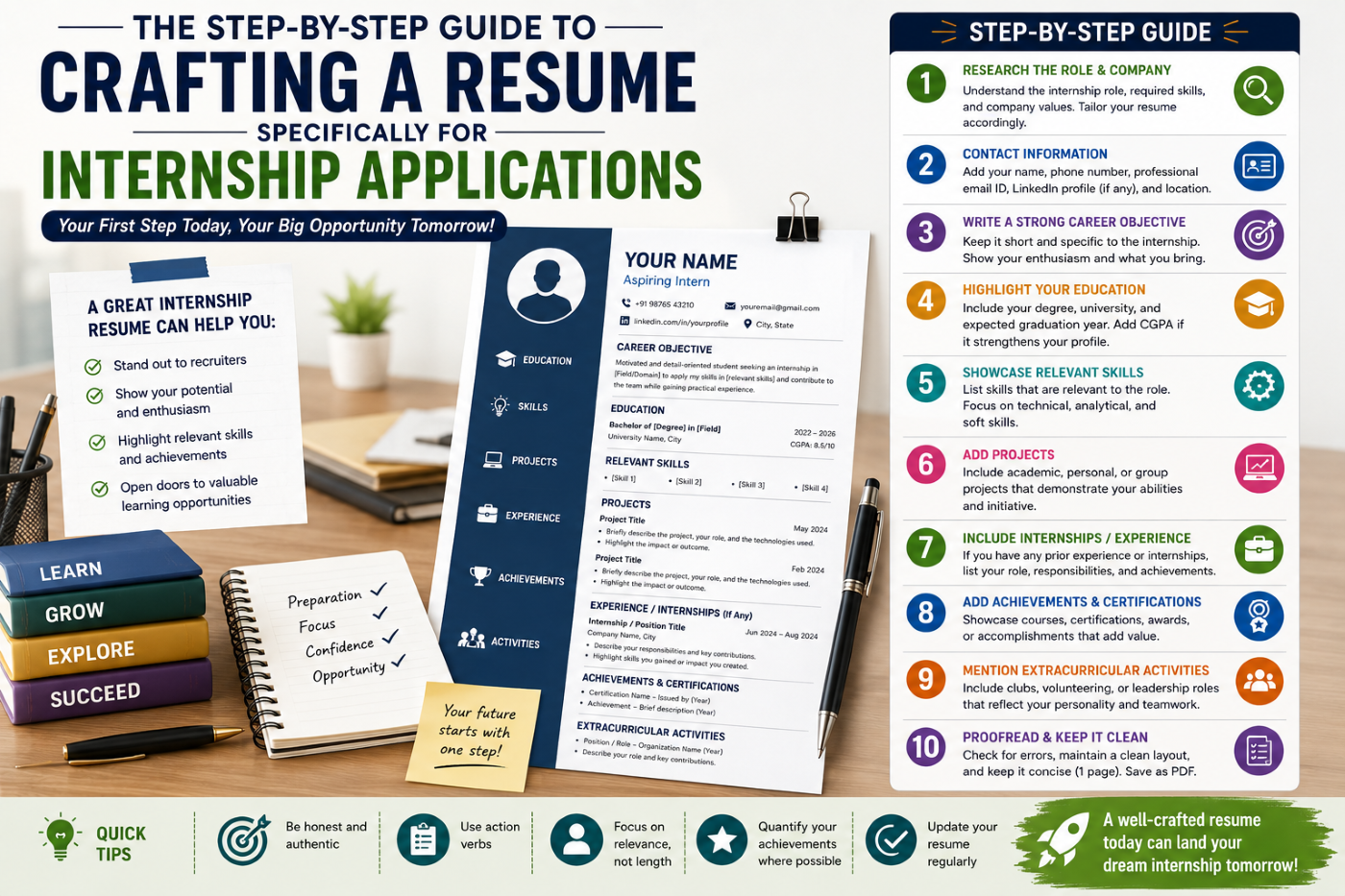
    Ideal ATS-Friendly Resume Structure

    Follow this standard structure:

    1. Contact Information
    2. Professional Summary / Objective
    3. Skills
    4. Work Experience
    5. Education
    6. Certifications
    7. Projects (if applicable)

    This format is widely recognized by ATS systems.

    Use Standard Section Headings

    ATS software looks for familiar headings.

    Use:

    • Contact Information
    • Summary or Objective
    • Skills
    • Work Experience
    • Education

    Avoid creative headings like:

    • “My Journey”
    • “Career Story”

    Unusual headings may confuse the system.

    Choose Simple Formatting

    ATS systems cannot read complex designs properly.

    Use:

    ✔ Single-column layout
    ✔ Left-aligned text
    ✔ Standard fonts
    ✔ Bullet points

    Avoid:

    ✘ Tables
    ✘ Text boxes
    ✘ Graphics
    ✘ Icons
    ✘ Columns

    Simple formatting ensures better readability.

    Use Professional Fonts

    Stick to basic fonts such as:

    • Arial
    • Calibri
    • Times New Roman
    • Helvetica

    Font size:

    • 10–12 for body text
    • 12–14 for headings

    Avoid decorative or script fonts.

    Include Relevant Keywords

    Keywords are the most important factor in ATS ranking.

    Carefully read the job description and include relevant terms.

    Example:

    If the job requires:

    • “Digital Marketing”
    • “SEO”
    • “Data Analysis”

    Make sure these appear naturally in your resume.

    Use Bullet Points for Clarity

    Bullet points help ATS scan your resume easily.

    Example:

    • Managed digital campaigns
    • Increased website traffic by 30%
    • Conducted market research

    Avoid long paragraphs.

    Write Clear Job Titles

    Use standard job titles that ATS can recognize.

    Example:

    ✔ Marketing Executive
    ✔ Sales Associate
    ✔ Data Analyst

    Avoid vague titles like:

    ✘ Growth Ninja
    ✘ Sales Rockstar

    Clarity improves ranking.

    Save Your Resume in the Right Format

    Best formats:

    • PDF (preferred in most cases)
    • Word (.docx) if required

    Always follow the job application instructions.

    Avoid uncommon file formats.

    Keep Resume Length Appropriate

    ATS does not reject resumes based on length, but readability matters.

    Best practice:

    • Freshers: 1 page
    • Experienced: 1–2 pages

    Keep content relevant and concise.

    Avoid Headers and Footers

    Important information placed in headers or footers may not be read by ATS.

    Keep all content in the main body of the document.

    Do Not Use Images or Graphics

    ATS cannot read images.

    Avoid:

    • Profile photos
    • Logos
    • Charts
    • Infographics

    Stick to text-only content.

    Use Consistent Formatting

    Maintain uniform formatting throughout:

    • Same font style
    • Same bullet format
    • Consistent spacing

    Inconsistency can confuse ATS parsing.

    Example of ATS-Friendly Resume Format

    Rahul Sharma
    Kolkata, West Bengal
    +91 XXXXXXXX
    rahul@email.com

    Professional Summary
    Motivated marketing graduate with skills in SEO, content strategy, and data analysis.

    Skills

    • SEO
    • Digital Marketing
    • MS Excel
    • Communication

    Work Experience
    Marketing Intern | ABC Pvt. Ltd. | Jan 2025 – Mar 2025

    • Increased engagement by 20%
    • Assisted in campaign planning

    Education
    BBA, XYZ University | 2024

    Certifications
    Google Digital Marketing

    This format is simple, clear, and ATS-friendly.

    Common ATS Resume Mistakes

    Avoid these mistakes:

    • Using complex designs
    • Missing keywords
    • Adding images
    • Using unusual headings
    • Writing long paragraphs
    • Incorrect file format

    Even small errors can reduce your chances.

    Final Thoughts

    An ATS-friendly resume format is essential in today’s job market. It ensures your resume gets noticed, properly scanned, and shortlisted.

    At CvDragon, we recommend focusing on simplicity, clarity, and relevance. A well-optimized resume not only passes ATS but also impresses recruiters.

    Remember, your resume must first pass the system—then win the recruiter.

  • What is ATS?

    If you’ve ever applied for jobs online and didn’t hear back, even when you were qualified, there’s a good chance your resume didn’t pass through an ATS. Understanding ATS is crucial for every job seeker today because it plays a major role in the hiring process.

    At CvDragon, we believe that knowing how ATS works can significantly improve your chances of getting shortlisted.

    What Does ATS Stand For?

    ATS stands for Applicant Tracking System.

    It is a software used by companies to collect, sort, and filter job applications before they reach human recruiters.

    In simple terms, ATS acts as a first-level screening system.

    Why Do Companies Use ATS?

    Recruiters often receive hundreds or even thousands of applications for a single job.

    Manually reviewing each resume is time-consuming.

    ATS helps companies:

    • Save time
    • Filter relevant candidates
    • Organize applications
    • Search resumes using keywords
    • Improve hiring efficiency

    It ensures that only the most relevant resumes reach the recruiter.

    How ATS Works

    When you submit your resume online, it goes into the ATS database.

    The system then scans your resume and analyzes:

    • Keywords
    • Skills
    • Work experience
    • Education
    • Job titles

    It compares your resume with the job description.

    Based on this, it assigns a score or ranking.

    Only resumes that match the criteria move forward.

    Example of ATS in Action

    Suppose a company is hiring for a marketing role.

    The job description includes keywords like:

    • Digital Marketing
    • SEO
    • Social Media
    • Content Strategy

    If your resume includes these keywords, ATS is more likely to shortlist you.

    If not, your resume may be rejected—even if you have the required skills.

    Key Features of ATS

    ATS systems typically:

    • Scan resumes for keywords
    • Rank candidates
    • Store application data
    • Track hiring progress
    • Allow recruiters to search profiles

    Some popular ATS software used by companies include:

    • Workday
    • Greenhouse
    • Lever

    These platforms are widely used in corporate hiring.

    Why ATS Is Important for Job Seekers

    If your resume is not ATS-friendly, it may never be seen by a human recruiter.

    This is why many qualified candidates get rejected early.

    Understanding ATS helps you:

    • Increase resume visibility
    • Improve shortlisting chances
    • Match job requirements better
    • Avoid common resume mistakes

    How to Make Your Resume ATS-Friendly

    To pass ATS screening, follow these best practices:

    Use Relevant Keywords

    Include keywords from the job description.

    For example:

    If the job mentions “data analysis,” include it naturally in your resume.

    Use Standard Headings

    Use headings like:

    • Work Experience
    • Education
    • Skills

    Avoid creative headings like “My Journey” or “What I Do.”

    Keep Formatting Simple

    Avoid:

    • Tables
    • Graphics
    • Text boxes
    • Icons

    ATS may not read these properly.

    Use a Professional Font

    Stick to simple fonts like:

    • Arial
    • Calibri
    • Times New Roman

    Save in the Right Format

    Use PDF or Word format, depending on the employer’s instructions.

    Avoid Keyword Stuffing

    Do not overload your resume with keywords.

    Keep the content natural and meaningful.

    Common ATS Mistakes to Avoid

    Many candidates unknowingly make mistakes that reduce their chances.

    Avoid:

    • Using images or logos
    • Complex layouts
    • Missing keywords
    • Unclear job titles
    • Spelling errors

    Even small issues can affect ATS ranking.

    ATS vs Human Recruiters

    It’s important to understand that ATS is only the first step.

    Once your resume passes ATS, a human recruiter will review it.

    So your resume must be:

    • ATS-friendly
    • Easy to read
    • Impactful

    Both systems matter.

    Final Thoughts

    An Applicant Tracking System (ATS) is a powerful tool used by companies to manage and filter job applications. For job seekers, understanding how it works is essential in today’s digital hiring process.

    At CvDragon, we recommend creating resumes that are both ATS-friendly and recruiter-friendly. A well-optimized resume increases your chances of getting noticed and moving forward in the hiring process.

    Remember, your resume must first impress the system—then impress the recruiter.

  • How Students Can Learn Multiple Skills

    How Students Can Learn Multiple Skills

    In today’s fast-changing world, relying on just one skill is no longer enough. Students are expected to be adaptable, versatile, and capable of handling multiple challenges. Whether it’s communication, technical knowledge, or creative thinking, learning multiple skills can significantly improve academic performance and career opportunities.

    However, many students struggle with a common question: How can I learn multiple skills without feeling overwhelmed? The answer lies in strategy, not pressure. At CvDragon, we believe that with the right approach, students can build multiple skills efficiently and sustainably.

    Why Learning Multiple Skills Matters

    Learning multiple skills helps students:

    • Become more adaptable
    • Improve problem-solving ability
    • Increase career opportunities
    • Build confidence
    • Stand out in competitive environments

    For example, a student with both marketing knowledge and data analysis skills has a strong advantage in today’s job market.

    Focus on Skill Stacking

    Instead of learning unrelated skills randomly, focus on skill stacking.

    Skill stacking means combining complementary skills that work well together.

    Examples:

    • Marketing + Content Writing + SEO
    • Business + Communication + Data Analysis
    • Law + Research + Public Speaking

    This approach makes learning more practical and career-focused.

    Prioritize One Skill at a Time

    Trying to learn multiple skills simultaneously is one of the biggest mistakes students make.

    Start with one primary skill.

    Once you reach a basic level, introduce a second skill.

    For example:

    • Month 1: Learn Excel basics
    • Month 2: Continue Excel + start Data Analysis

    This method reduces overwhelm and improves focus.

    Use Time Blocking

    Time management is key when learning multiple skills.

    Divide your day into focused blocks.

    Example:

    • Morning: Academic studies
    • Afternoon: Skill 1 (e.g., coding)
    • Evening: Skill 2 (e.g., communication practice)

    Even 30–60 minutes per skill is enough if done consistently.

    Apply the 80/20 Rule

    The Pareto Principle (80/20 rule) suggests that 80% of results come from 20% of efforts.

    Focus on the most important aspects of a skill first.

    For example:

    • In coding: Learn core concepts before advanced topics
    • In language learning: Focus on commonly used words
    • In marketing: Understand basics before tools

    This helps you learn faster and avoid unnecessary complexity.

    Use Microlearning Techniques

    Microlearning means learning in small, focused sessions.

    Instead of studying for long hours:

    • Watch a short tutorial
    • Practice one concept
    • Revise key points

    This makes it easier to manage multiple skills without burnout.

    Practice Actively

    Learning multiple skills requires practice, not just theory.

    Examples:

    • Coding → Build small projects
    • Communication → Practice speaking daily
    • Writing → Write blogs or essays
    • Business → Analyze case studies

    Active practice helps skills develop faster and more effectively.

    Track Your Progress

    Tracking helps you stay organized when managing multiple skills.

    You can track:

    • Time spent on each skill
    • Topics completed
    • Improvement levels

    Tools like:

    • Notion
    • Google Sheets
    • Trello

    can help you monitor your progress easily.

    Avoid Overloading Yourself

    Learning multiple skills does not mean learning everything at once.

    Limit yourself to 2–3 skills at a time.

    Too many skills can lead to confusion and burnout.

    Focus on quality over quantity.

    Build a Consistent Routine

    Consistency is more important than intensity.

    Instead of long study sessions, aim for daily practice.

    Example:

    • 30 minutes coding
    • 20 minutes reading
    • 15 minutes communication practice

    Daily effort leads to long-term improvement.

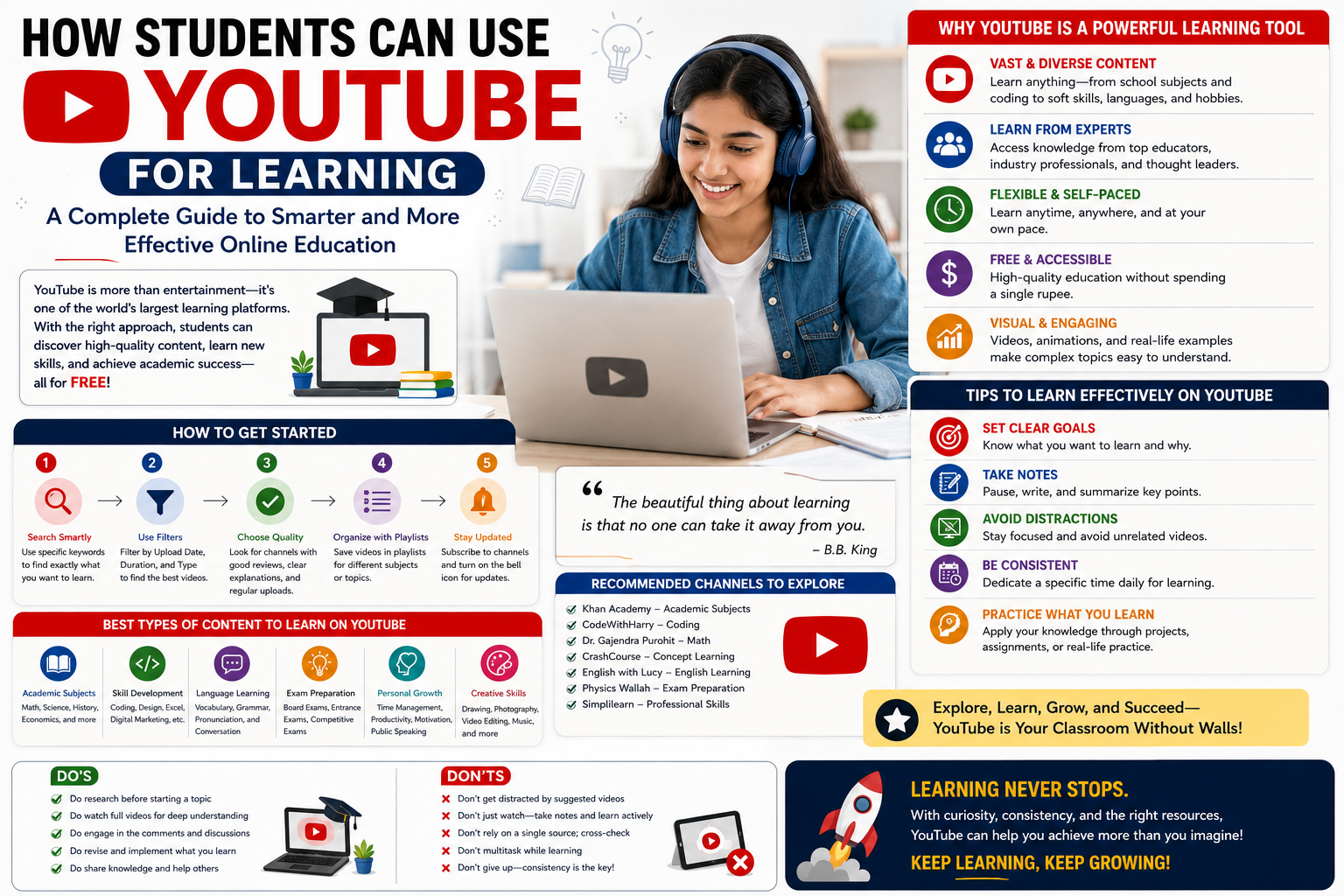
    Learn from Multiple Sources

    Use a mix of resources to improve your skills:

    • Online courses
    • YouTube tutorials
    • Books
    • Practice platforms
    • Mentors

    Different sources provide different perspectives, which improves understanding.

    Combine Learning with Real-Life Application

    One of the best ways to learn multiple skills is to use them together.

    For example:

    • Create a blog → Writing + SEO + Marketing
    • Start a small project → Planning + Execution + Analysis
    • Participate in competitions → Communication + Strategy

    This makes learning more practical and engaging.

    Take Breaks and Avoid Burnout

    Learning multiple skills can be tiring if not managed properly.

    Take breaks regularly.

    Rest helps your brain absorb information better.

    Balance is essential for long-term success.

    Stay Patient and Flexible

    Skill development takes time.

    Progress may be slow in the beginning.

    Be patient and adjust your learning strategy if needed.

    Consistency will eventually bring results.

    Final Thoughts

    Learning multiple skills is not about doing more—it’s about learning smarter. By focusing on skill stacking, managing your time effectively, and practicing consistently, students can build valuable skills without feeling overwhelmed.

    At CvDragon, we encourage students to take a structured and balanced approach to skill development. The goal is not to learn everything quickly, but to learn effectively and sustainably.

    Remember, even small daily progress across multiple skills can lead to powerful long-term results.

  • Skill Journaling for Students

    In a world where students are constantly learning new subjects and skills, one powerful yet underrated tool can make a big difference—skill journaling. It’s simple, effective, and highly practical. Instead of just studying and moving on, skill journaling helps you reflect, track progress, and improve consistently.

    At CvDragon, we believe that learning becomes more meaningful when you actively engage with it. Skill journaling is not just about writing—it’s about understanding your growth and becoming a smarter learner.

    What Is Skill Journaling?

    Skill journaling is the practice of recording your learning journey.

    It involves writing down:

    • What you learned
    • What you practiced
    • What you struggled with
    • What you improved

    This process turns passive learning into active reflection.

    Instead of forgetting what you studied, you build a record of your progress over time.

    Why Skill Journaling Matters

    Many students study regularly but fail to track their improvement.

    Skill journaling helps you:

    • Understand your strengths and weaknesses
    • Improve self-awareness
    • Retain information better
    • Stay consistent
    • Measure progress over time

    It also boosts confidence because you can clearly see how far you’ve come.

    How Skill Journaling Improves Learning

    Writing about what you learn activates deeper thinking.

    When you reflect on a topic, your brain processes it more effectively.

    This improves:

    • Memory retention
    • Concept clarity
    • Problem-solving ability

    It also helps identify gaps in understanding.

    If you cannot explain something clearly in your journal, it means you need to revise it.

    What to Write in a Skill Journal

    A good skill journal should be simple and structured.

    You don’t need long paragraphs—just clear and meaningful entries.

    Here’s what you can include:

    1. Date and Topic

    Write the date and what you studied.

    Example:
    April 29 – Learned basic Excel formulas

    2. Key Learnings

    Summarize what you understood.

    Example:

    • SUM and AVERAGE functions
    • Basic data formatting

    3. Practice Done

    Mention what you practiced.

    Example:

    • Solved 10 Excel problems
    • Created a sample spreadsheet

    4. Challenges Faced

    Be honest about difficulties.

    Example:

    • Struggled with formula errors
    • Confused about cell references

    5. Improvements

    Track progress.

    Example:

    • Improved accuracy
    • Better understanding of formulas

    6. Next Step

    Plan what to do next.

    Example:

    • Learn VLOOKUP tomorrow

    This structure keeps your journal focused and useful.

    Daily vs Weekly Journaling

    Students can choose between:

    Daily Journaling

    • Short entries (5–10 minutes)
    • Helps track consistency
    • Best for active learners

    Weekly Journaling

    • Longer reflections
    • Focus on overall progress
    • Helps in planning

    You can also combine both for better results.

    Tools for Skill Journaling

    You can maintain a journal using:

    • A notebook
    • A diary
    • Digital tools

    Popular digital options include:

    • Notion
    • Google Docs
    • Evernote

    Choose a format that you can use consistently.

    Skill Journaling for Different Fields

    Skill journaling works for almost every subject.

    For Students in Business or Commerce

    • Record case studies
    • Track marketing concepts
    • Analyze business strategies

    For Technical Students

    • Document coding problems
    • Track debugging progress
    • Write learning notes

    For Language Learners

    • Write new vocabulary
    • Practice sentences
    • Track fluency improvements

    For Competitive Exams

    • Record test scores
    • Note weak areas
    • Track revision cycles

    Common Mistakes to Avoid

    While skill journaling is simple, some mistakes can reduce its effectiveness.

    Writing Too Much

    Long entries can feel tiring.

    Keep it short and focused.

    Being Inconsistent

    Skipping days reduces the value of journaling.

    Consistency is key.

    Not Reviewing Entries

    Writing alone is not enough.

    Review your journal regularly to track progress.

    Ignoring Weak Areas

    Be honest about challenges.

    That’s where real improvement happens.

    Tips to Stay Consistent

    Building a journaling habit can take time.

    Here are some tips:

    • Set a fixed time (after study sessions)
    • Keep entries short (5 minutes is enough)
    • Use bullet points
    • Make it part of your routine
    • Track your journaling streak

    The easier it is, the more likely you are to continue.

    Benefits in the Long Run

    Skill journaling is not just for short-term learning.

    Over time, it helps you:

    • Build discipline
    • Improve self-reflection
    • Develop problem-solving skills
    • Prepare better for exams
    • Build a growth mindset

    It also creates a record of your journey, which can be motivating and insightful.

    Final Thoughts

    Skill journaling is a simple habit with powerful results. It helps students move from passive studying to active learning and self-improvement.

    At CvDragon, we encourage students to take control of their learning process. Writing down your progress makes your efforts visible and meaningful.

    You don’t need to be perfect—you just need to be consistent.

    Start small, write daily, and watch your skills grow over time.

  • How Students Can Track Skill Progress

    Learning a skill is one thing—knowing whether you’re actually improving is another. Many students put in effort but struggle to measure their growth, which can lead to frustration or lack of motivation. Tracking skill progress is essential because it provides clarity, builds confidence, and helps you stay focused on your goals.

    At CvDragon, we believe that what gets measured gets improved. This guide will help students understand how to effectively track their skill development and stay on the path of continuous growth.

    Why Tracking Skill Progress Matters

    Without tracking, it’s easy to feel stuck—even when you’re improving.

    Monitoring your progress helps you:

    • Stay motivated
    • Identify strengths and weaknesses
    • Measure improvement over time
    • Adjust learning strategies
    • Build confidence

    Tracking turns learning into a visible and rewarding process.

    Set Clear Skill Goals

    Before tracking progress, you need to define what you are trying to improve.

    Avoid vague goals like:

    “I want to get better at coding”

    Instead, set clear and measurable goals:

    • Learn basic Python syntax in 2 weeks
    • Solve 20 coding problems
    • Improve typing speed from 40 WPM to 60 WPM

    Clear goals make it easier to track progress effectively.

    Break Skills into Smaller Milestones

    Big skills can feel overwhelming.

    Break them into smaller parts.

    For example, if you are learning digital marketing:

    • Understand SEO basics
    • Learn keyword research
    • Practice content optimization
    • Analyze website performance

    Tracking smaller milestones makes progress more visible and achievable.

    Use a Skill Tracker or Journal

    One of the simplest ways to track progress is by maintaining a record.

    You can use:

    • A notebook
    • A spreadsheet
    • A habit tracker
    • A digital app

    Track details like:

    • What you learned
    • Time spent
    • Tasks completed
    • Challenges faced

    Daily or weekly tracking builds awareness and consistency.

    Measure Progress with Metrics

    To truly track improvement, use measurable indicators.

    Examples:

    • Number of problems solved
    • Accuracy percentage
    • Speed (e.g., typing or calculations)
    • Test scores
    • Completed modules or lessons

    Metrics provide objective proof of growth.

    For example:

    Week 1: 5/10 correct answers
    Week 3: 8/10 correct answers

    This clearly shows improvement.

    Use Self-Testing and Quizzes

    Testing yourself is one of the best ways to measure skill progress.

    Instead of just studying:

    • Take quizzes
    • Solve practice tests
    • Attempt mock exams
    • Use flashcards

    Self-testing reveals what you actually remember and understand.

    It also highlights areas that need improvement.

    Track Consistency, Not Just Results

    Progress is not only about outcomes—it’s also about effort.

    Track how consistently you are practicing.

    For example:

    • Days studied in a week
    • Hours spent learning
    • Number of practice sessions

    Consistency is often the biggest indicator of long-term success.

    Use the “Before vs After” Method

    One powerful way to measure progress is comparison.

    Ask yourself:

    • What could I do before?
    • What can I do now?

    Examples:

    • Writing: Compare old essays with new ones
    • Coding: Compare early programs with recent ones
    • Speaking: Record and compare fluency over time

    This method makes improvement clearly visible.

    Get Feedback from Others

    External feedback helps you see blind spots.

    Ask for feedback from:

    • Teachers
    • Mentors
    • Peers
    • Online communities

    They can point out strengths and areas for improvement that you may not notice yourself.

    Feedback accelerates growth.

    Use Digital Tools for Tracking

    Technology can make tracking easier and more effective.

    Popular tools include:

    • Notion for organizing progress
    • Trello for tracking tasks
    • Google Sheets for data tracking

    These tools help visualize progress through charts, checklists, and dashboards.

    Review Progress Weekly

    Tracking daily is useful, but reviewing weekly is essential.

    At the end of each week, ask:

    • What did I learn?
    • What improved?
    • What needs more work?

    Weekly reviews help you adjust your strategy and stay on track.

    Celebrate Small Wins

    Progress is built step by step.

    Celebrate small achievements like:

    • Completing a module
    • Improving test scores
    • Practicing consistently for a week

    Recognition builds motivation and keeps you engaged.

    Avoid Comparing with Others

    Every student learns at a different pace.

    Comparing your progress with others can create unnecessary stress.

    Focus on your own improvement journey.

    The goal is to be better than you were yesterday.

    Stay Patient with the Process

    Skill development takes time.

    Progress may not always be visible immediately.

    Trust the process and keep tracking your efforts.

    Consistency combined with tracking leads to long-term success.

    Final Thoughts

    Tracking skill progress is a powerful habit that transforms learning into measurable growth. It helps students stay focused, motivated, and aware of their development.

    At CvDragon, we encourage students to take control of their learning journey by setting goals, measuring progress, and continuously improving.

    Remember, progress may be slow at times—but with consistent tracking, every step forward becomes visible and meaningful.

  • Building Consistency in Learning

    Building Consistency in Learning

    Consistency is one of the most powerful yet underrated factors in academic success. Many students rely on motivation to study, but motivation is temporary. What truly drives long-term results is the ability to show up every day, even when you don’t feel like it. Building consistency in learning is not about studying for long hours—it is about creating a system that makes learning a daily habit.

    At CvDragon, we believe that small, repeated efforts lead to big outcomes. This guide will help students understand how to build and maintain consistency in learning in a practical and sustainable way.

    Why Consistency Matters in Learning

    Learning is a gradual process. When students study consistently, they reinforce knowledge, improve understanding, and reduce the need for last-minute cramming.

    Consistent learning helps in:

    • Better memory retention
    • Reduced exam stress
    • Improved focus
    • Stronger subject understanding
    • Higher academic confidence

    Instead of overwhelming yourself before exams, daily effort keeps everything under control.

    Start Small to Build Momentum

    One of the biggest mistakes students make is trying to study too much too quickly.

    Consistency begins with small steps.

    Start with:

    • 20–30 minutes of focused study
    • One topic per day
    • A few practice questions

    Small actions are easier to repeat daily. Once the habit becomes stable, you can gradually increase your study time.

    Create a Fixed Study Routine

    Routine builds discipline.

    Choose a specific time each day for studying—morning, afternoon, or evening—and stick to it.

    When you study at the same time daily, your brain begins to expect it. This reduces resistance and makes it easier to start.

    Even on busy days, try to maintain at least a short study session to keep the habit alive.

    Set Clear Daily Goals

    Without clear goals, studying can feel unstructured.

    Instead of saying:

    “I will study today”

    Set specific targets like:

    • Complete one chapter
    • Solve 10 math problems
    • Revise notes for 30 minutes

    Clear goals make it easier to take action and track progress.

    Use the Power of Habit Stacking

    Habit stacking is a simple method to build consistency.

    Attach a new study habit to an existing routine.

    Examples:

    • After breakfast, revise one topic
    • After class, summarize notes
    • Before bed, read for 15 minutes

    Since the existing habit already has a trigger, the new habit becomes easier to follow.

    Focus on Active Learning

    Consistency is not just about showing up—it is about learning effectively.

    Use active learning techniques like:

    • Self-testing
    • Teaching concepts to others
    • Writing summaries
    • Solving practice questions

    Active learning keeps your mind engaged and improves retention.

    Track Your Progress

    Tracking helps maintain consistency.

    You can use:

    • A study journal
    • A checklist
    • A calendar
    • Habit tracking apps

    Mark each day you complete your study session.

    Seeing your progress builds motivation and encourages you to continue.

    Remove Distractions

    Distractions are one of the biggest barriers to consistency.

    Common distractions include:

    • Social media
    • Mobile notifications
    • Background noise

    To stay consistent:

    • Keep your phone away during study time
    • Use focus apps
    • Choose a quiet study environment

    A distraction-free setup makes it easier to concentrate daily.

    Don’t Rely on Motivation

    Motivation comes and goes.

    Consistency is built on discipline, not feelings.

    There will be days when you don’t feel like studying. On those days, focus on showing up, even if only for a short time.

    Action creates motivation—not the other way around.

    Reward Yourself for Consistency

    Positive reinforcement helps build habits.

    After completing your study session, reward yourself with something small like:

    • Watching a show
    • Listening to music
    • Taking a break
    • Enjoying a snack

    This creates a positive association with studying.

    Learn to Handle Breaks and Setbacks

    Missing a day does not mean failure.

    What matters is how quickly you get back on track.

    Avoid the “all or nothing” mindset.

    If you miss one day, continue the next day without guilt.

    Consistency is built over time, not in a perfect streak.

    Balance Study and Rest

    Overstudying can lead to burnout, which breaks consistency.

    Take regular breaks and maintain a healthy balance between study and rest.

    A fresh mind learns better and stays consistent longer.

    Surround Yourself with the Right Environment

    Your environment influences your habits.

    Study in a space that is:

    • Clean
    • Organized
    • Quiet
    • Comfortable

    Being around focused peers or study groups can also improve consistency.

    Build a Growth Mindset

    Students who believe they can improve with effort are more likely to stay consistent.

    Instead of thinking:

    “I’m not good at this subject”

    Think:

    “I will improve with practice”

    This mindset encourages persistence.

    Final Thoughts

    Building consistency in learning is not about perfection—it is about persistence. Small daily efforts create strong habits, and strong habits lead to long-term success.

    At CvDragon, we encourage students to focus on building systems rather than chasing motivation. When learning becomes a daily routine, success becomes a natural outcome.

    Remember, consistency beats intensity every time. Show up daily, even in small ways, and the results will follow.