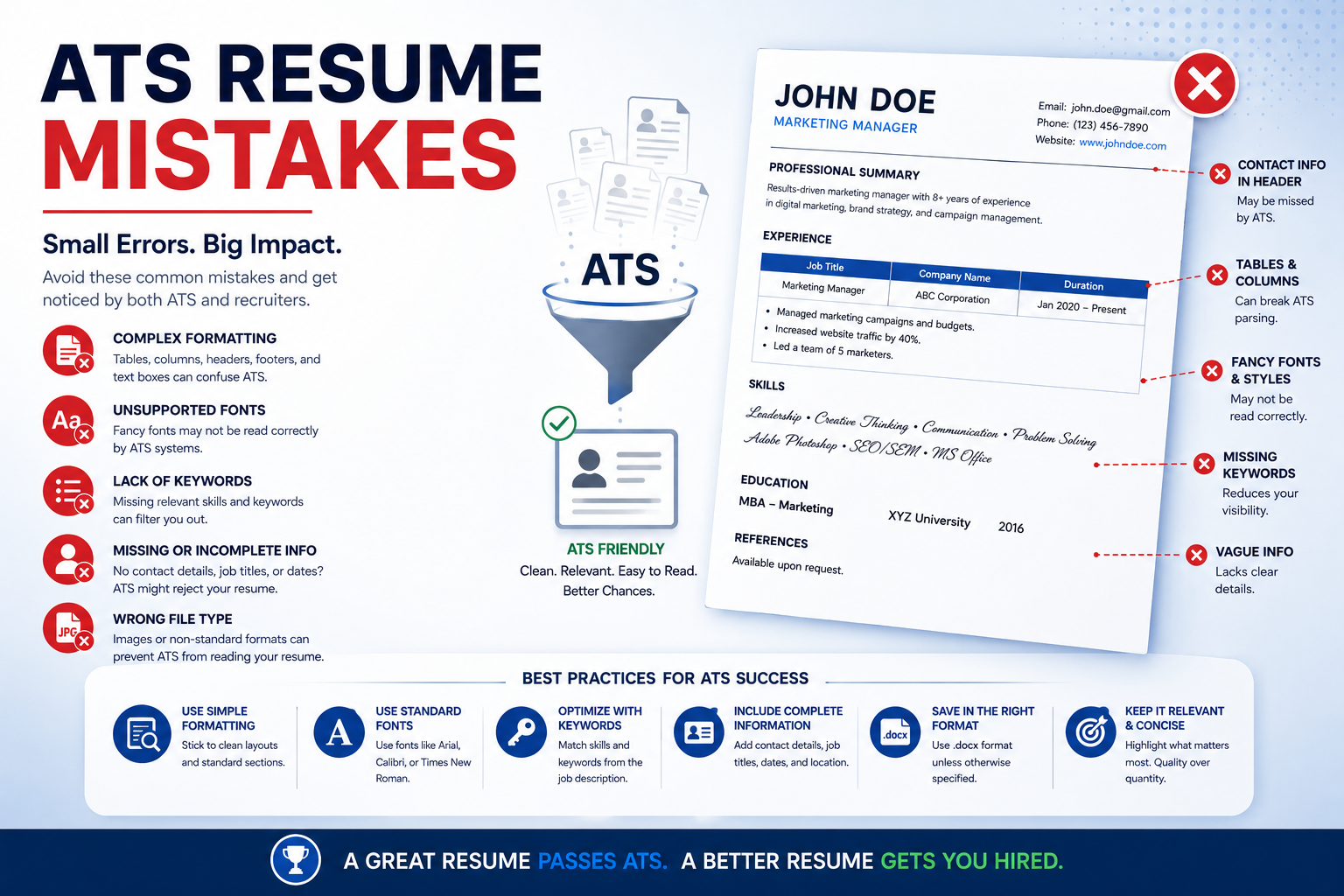
An Applicant Tracking System (ATS) is designed to scan, organize, and filter resumes before they reach recruiters. Many companies use ATS software to handle large volumes of job applications efficiently. However, even highly qualified candidates often get rejected because their resumes are not ATS-friendly. Small formatting errors, missing keywords, or poor structure can prevent a resume from being properly scanned and ranked.
Understanding common ATS resume mistakes can significantly improve your chances of passing the initial screening process and reaching hiring managers.
Using Complex Resume Designs
One of the most common ATS mistakes is using overly designed resumes with graphics, tables, icons, text boxes, or multiple columns. While these designs may look visually appealing to humans, many ATS systems struggle to read them correctly.
Simple and clean formatting works best. Use a professional layout with standard fonts, clear headings, and consistent spacing. Avoid decorative elements that may confuse the ATS parser.
Choosing the Wrong File Format
Some ATS platforms cannot properly read uncommon file formats. Submitting resumes in unsupported formats may result in incomplete or corrupted data during scanning.
In most cases, PDF and DOCX are the safest formats unless the employer specifically requests a different one. Always follow the application instructions carefully.
Missing Relevant Keywords
ATS software searches resumes for keywords related to the job description. If your resume lacks important terms, skills, or qualifications, it may rank lower even if you are qualified.
Carefully analyze the job posting and include relevant keywords naturally throughout your resume. These may include:
- Technical skills
- Certifications
- Industry tools
- Job titles
- Software platforms
- Core competencies
For example, if a job description mentions “project management,” “data analysis,” or “SEO optimization,” those exact phrases should appear where applicable in your resume.
Keyword Stuffing
While keywords are important, overusing them unnaturally can harm your resume. ATS systems and recruiters can detect keyword stuffing, which makes resumes appear robotic and unprofessional.
Use keywords strategically within meaningful sentences that describe your achievements and experience.
Using Unclear Job Titles
Creative job titles may sound impressive, but ATS software may not recognize them properly. For example, using “Sales Ninja” instead of “Sales Executive” can create confusion during keyword matching.
Use standard industry-recognized job titles whenever possible so the ATS can accurately categorize your experience.
Ignoring Resume Section Headings
ATS systems rely on clear section headings to organize resume information. Using unconventional headings like “My Journey” instead of “Work Experience” may cause important information to be missed.
Stick with standard headings such as:
- Professional Summary
- Work Experience
- Education
- Skills
- Certifications
- Projects
This improves readability for both ATS software and recruiters.
Including Graphics and Images
Photos, logos, charts, and icons are usually unreadable by ATS systems. In some cases, they may even break resume parsing entirely.
Keep resumes text-based and avoid unnecessary visuals unless specifically required for creative industries.
Using Headers and Footers Incorrectly
Some ATS software cannot properly read information placed inside headers or footers. If your phone number or email address is stored there, it may not be detected.
Place all important contact details directly in the main body of the resume.
Lack of Measurable Achievements
Many resumes focus only on responsibilities rather than accomplishments. ATS systems may detect keywords, but recruiters also want measurable results.
Instead of writing:
“Managed social media accounts”
Write:
“Increased social media engagement by 40% within six months through targeted content campaigns.”
Quantifiable achievements improve both ATS performance and recruiter interest.
Using Abbreviations Without Full Forms
Some ATS systems search for exact keyword matches. Using abbreviations alone may reduce visibility.
For example:
- Write “Search Engine Optimization (SEO)”
- Write “Human Resources (HR)”
- Write “Customer Relationship Management (CRM)”
This helps match both abbreviation-based and full-form searches.
Poor Resume Formatting
Inconsistent fonts, unusual symbols, excessive colors, and improper spacing can confuse ATS software.
Best practices include:
- Use standard fonts like Arial, Calibri, or Times New Roman
- Maintain consistent formatting
- Use bullet points for readability
- Avoid special characters and fancy symbols
Simple formatting increases ATS compatibility.
Not Customizing the Resume
Sending the same generic resume to every company is a major mistake. ATS systems compare resumes directly with job descriptions.
Tailor your resume for each application by adjusting:
- Keywords
- Skills
- Summary section
- Experience highlights
Customized resumes perform significantly better in ATS rankings.
Adding Irrelevant Information
Including outdated or unrelated experience can dilute important keywords and reduce resume focus.
Keep your resume concise and relevant to the target role. Highlight experience, projects, and skills that directly align with the position.
Using Fancy Fonts or Symbols
ATS systems may not recognize decorative fonts or symbols properly. This can distort resume content during parsing.
Stick with clean, professional fonts and avoid emojis or non-standard symbols.
Failing to Include Skills Section
A missing or weak skills section can lower ATS rankings because many systems specifically scan this area for keyword matches.
Create a dedicated skills section that includes:
- Technical skills
- Software tools
- Industry knowledge
- Certifications
- Soft skills relevant to the role
Spelling and Grammar Errors
Even small mistakes can impact ATS keyword matching and create a negative impression with recruiters.
Always proofread carefully and use grammar-checking tools before submitting your resume.
Overloading the Resume
Long, cluttered resumes can reduce readability and dilute key information. Recruiters often spend only a few seconds reviewing resumes after ATS screening.
Focus on concise, impactful content that clearly demonstrates your qualifications.
Final Thoughts
An ATS-friendly resume is not about tricking software—it is about creating a clear, professional, and optimized document that communicates your value effectively. By avoiding common ATS resume mistakes, candidates can improve their chances of passing automated screenings and getting noticed by recruiters.
A strong ATS resume should combine strategic keyword optimization, clean formatting, measurable achievements, and role-specific customization. When done correctly, it increases both ATS rankings and human readability, giving job seekers a stronger competitive advantage in today’s hiring market.
Leave a Reply